In this guide 6 sections
Follow one real order from the WhatsApp message to the paid invoice and mark every place where someone types it again. Most of those entries are copies, not decisions. Remove the copies first by letting one record feed the others, and keep approvals wherever a person must look at the situation.
Trace one order from first message to receipt
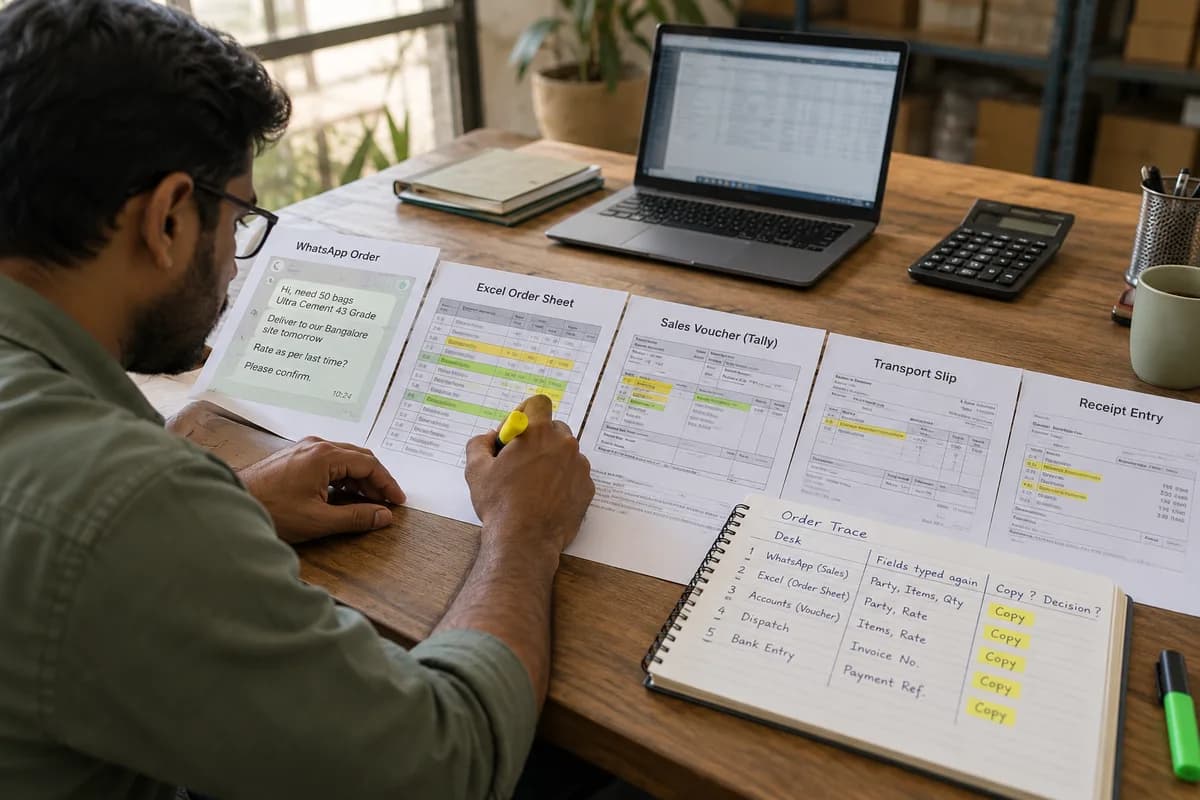
Pick a recent order of ordinary size. Print the WhatsApp message, the Excel order sheet row, the sales voucher, the transport slip and the receipt entry, then lay all five on one table. Add the e-way bill, the lorry receipt and the bank slip if the order is already paid, because every extra paper shows another desk that rekeys the same consignment.
Now read across. Party name, item codes, quantities and rates should match everywhere, yet a bag of 25 kilograms becomes a carton of 24 between the salesman’s phone and the godown register.
Note who typed each version and when. That list is your map. It shows every desk that touches the same facts before a single rupee is collected, and the count usually surprises owners.
Mark each entry as a copy or a decision
Take two highlighters. Yellow goes on every field someone read off one screen and keyed into another, such as the party name or the rate. Green is for choices.
Copies add delay and typing errors but no judgement, so they are the target and the first thing to remove. Decisions differ, because a person looked at the situation and said yes or no, and that look is worth keeping.
Yellow outnumbers green on most orders. The party master, the rate list and the ship-to address are keyed again on almost every order, and each retyping is a fresh chance for a wrong digit. Count them on one order before arguing about software, because twenty copies in a single order is normal for a distributor with three clerks.
- Party name, GSTIN and ship-to address
- Item code, description and unit of measure
- Quantity and rate carried over from the quotation
- Invoice number copied onto the transport slip
- Payment reference copied into the ledger
Remove copies in the order of pain
Start where errors cost money. A wrong rate on an invoice means a credit note and an awkward phone call, and a wrong address means a returned parcel. Fix those hand-offs before the tidy ones.
Give each fact one home. The party master lives in one file, the order sheet pulls from it with a lookup, and the voucher import reads the sheet instead of a second keyboard. Day one needs no new software. A protected Excel sheet with dropdowns for party and item already stops half of the spelling variants that split one customer into three ledger accounts.
Change one hand-off at a time. Run old and new side by side for a week, compare day totals every evening, and retire the manual step only when the two agree.
- Excel order sheet to voucher import file
- WhatsApp order text to a structured order form
- Dispatch confirmation to the invoice print
- Bank statement lines to receipt matching
Keep the approvals a person must see
Automation must not hide the green fields. A credit limit breach, a rate below the floor or a return against an old invoice still needs a human. Route each to a named approver.
Make the exception stand out. The approver sees what differs from the usual, the party’s outstanding balance, the last three invoices and the reason typed by the salesman. One tap approves or sends it back. Keep it plain.
Log who approved and when. The record settles March disputes.
Measure, then pick the next hand-off
Count keystroke events before and after. How often is the party name typed? Once is the target. Also count mismatches caught at month-end reconciliation, since that figure should fall steadily as each hand-off is repaired and each clerk stops rekeying the same party name. Watch the overtime too. When the evening entry batch shrinks from two hours to twenty minutes, the clerk has proof that the change worked and no reason to resist the next one.
Ask the clerks what still annoys them. They know which sheet gets pasted twice and which WhatsApp group collects screenshots instead of orders, and their list becomes your next phase.
This week, run the trace on one order and bring the marked printouts to a short meeting with the dispatch clerk and the person who keys vouchers. Start there.
Order retyping trace sheet
One row per desk the order touches. Columns are the desk, the source document, the fields typed again, the time typed, the person, and a mark for copy or decision. A last block totals the copies.
Open a blank worksheet to printQuestions owners ask
Where should we start if everything is retyped?
Start with the hand-off that causes the most disputes, usually the rate or address between the order and the invoice. One clean fix teaches more.
Can WhatsApp orders feed our accounts software directly?
Often yes, through a structured order form or a message template that a script reads and checks against the party master before anything reaches a voucher. Free-typed text needs a human check. Keep the original message attached to the voucher so an auditor or a salesman can see exactly what the buyer wrote.
Do we need to replace Excel?
Not at first. Excel works as a staging sheet if the columns are fixed, the dropdowns are protected and every voucher import reads from it. Replace it once several clerks need to edit it at once and the file keeps locking or splitting into copies.
How do we stop errors during the changeover?
Run both paths for a week. Compare day totals every evening. Any difference points to a field mapped wrongly, which you can then correct in the party master or the voucher import file before it reaches the ledger.