In this guide 6 sections
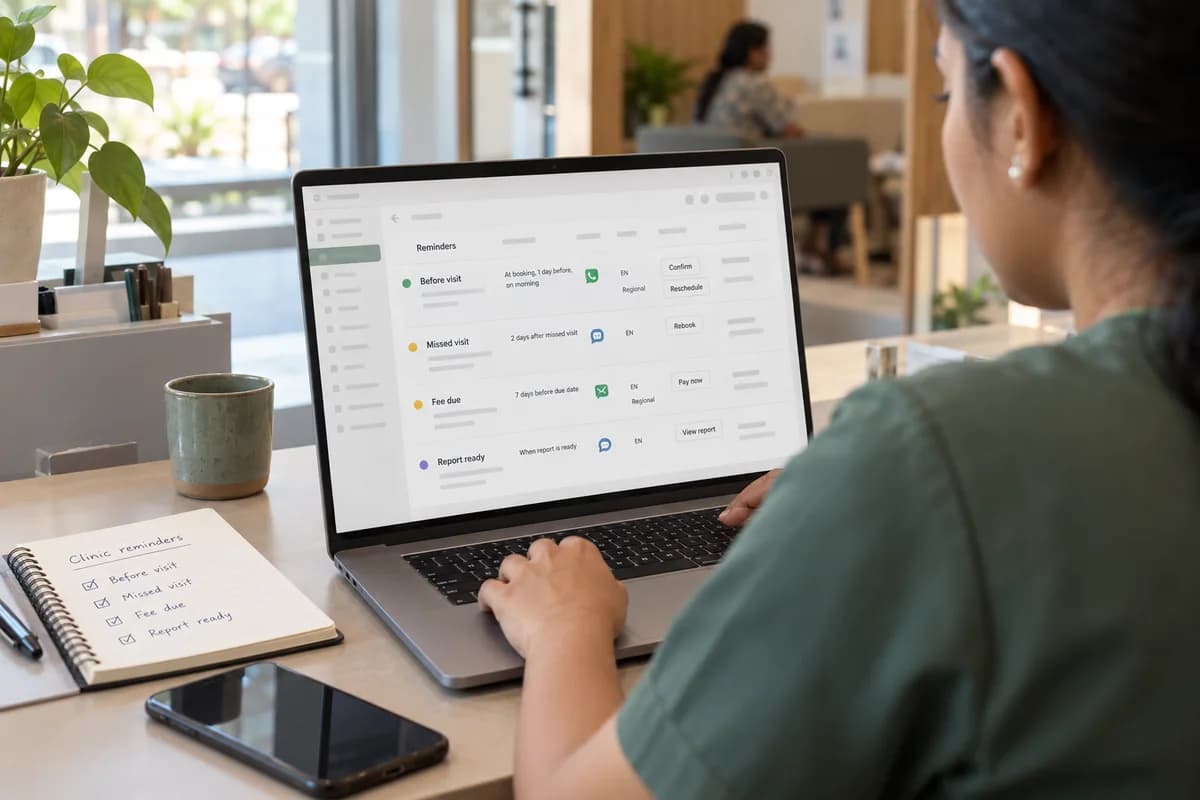
Plan reminders as three separate flows: before the visit, after a missed one and when a fee falls due. Give each its own timing, channel and language. Let a reply such as a button tap move the slot in the booking system, so no message waits in a receptionist’s phone.
Split the reminders into three flows
A clinic group usually sends one message and hopes. Three flows work better because each has a different goal. Before the visit, the goal is attendance. After a missed visit, it is rebooking. For fees, it is payment without awkwardness. A single message cannot ask a patient to confirm, prepare, pay and rebook, and a patient given four requests usually acts on none.
Write each flow on one sheet with the trigger, the delay, the wording and the next step. Keep them apart in the system too. A patient with an overdue consultation fee should not receive a cheerful visit reminder in the same minute, from the same sender, with no link between the two. A visit reminder that arrives beside a payment demand feels like a threat, and patients stop opening both.
Diagnostic groups add a fourth. The report-ready note.
- Before the visit: confirm, prepare, reschedule
- After a missed visit: rebook within a set window
- Fee due: amount, link, last date
- Report ready: where to collect or download
Time each message to the patient’s day
Send the first message when the booking is made, with the doctor’s name, the branch address and a map pin. Send the second a day before. Add a short one on the morning for early slots. Early appointments need the extra note because patients who wake late often check their phone only after the slot has begun.
Fasting blood tests need an evening note telling the patient what to avoid. A dentist’s scaling follow-up needs a prompt after the interval the doctor set, not after a fixed number of days that suits the software.
Skip late nights. Set quiet hours at the clinic level and let each branch adjust for its own opening times. A group with a branch in different shift patterns should keep these hours on the branch record rather than in a global setting.
Choose the channel and language per patient
WhatsApp reaches most patients, but older patients may only read SMS. Ask for the preference at registration. Store it on the patient record, with a fallback that fires if delivery fails on the first channel. Where a family shares one phone, a patient may not want a diagnosis hinted at, so keep the wording neutral and name only the clinic.
Language matters, wording polish does not. A patient who reads a regional language will act on a message in that language. Keep one approved template per language, reviewed by someone who speaks it. A pharmacist or a nurse who speaks the language should check each version before it goes live.
Business messaging on WhatsApp needs pre-approved templates and recorded consent. Check the current provider rules before you write the wording.
- Preferred channel and fallback on the patient record
- One approved template per language
- Consent stored with date and source
- Branch name and phone in every message
Make replies reschedule the slot
The weak point is the reply. A patient answers “can I come tomorrow?” and the message lands in the front-desk phone of one branch, read by whoever is free.
Use reply buttons: confirm, change time, cancel. A change request should offer the next three open slots from the booking calendar and book the choice itself. Show the choices as buttons rather than free text, because a patient on a small screen rarely types a full reply.
Anything outside the buttons, such as a question about medication, goes to a staff queue with the patient’s record attached. A staff member should answer those within the hour, and the response time should appear on the same report as the confirmations.
Measure what the reminders change
Track confirmations, reschedules, no-shows and fees paid by the due date for each branch. Compare a branch before and after you switch the flows on. The comparison tells you which flow earns its place and which only adds noise.
Review the wording monthly. Trim it. Short messages with one clear action usually do better. Start with one branch for a fortnight, then extend the flows to the rest. Add the reply buttons only after the basic reminders have worked for a month, since each addition needs its own wording and testing.
Clinic reminder plan sheet
One sheet, four rows: before visit, missed visit, fee due and report ready. Columns give the trigger event, send time, channel, language, template text, reply options and the staff queue that receives exceptions. A footer records quiet hours per branch.
Open a blank worksheet to printQuestions owners ask
How many reminders are too many?
Two before a visit and one after a miss is usually enough. Watch opt-outs by branch and cut back where they rise.
Can reminders mention the fee amount?
Yes, with a payment link, but avoid medical details in the message. Keep treatment information inside the secure portal or on the call.
What if a patient has no smartphone?
Use SMS or an automated call, and let the front desk reschedule from the same booking calendar.
Do we need a new booking system?
Not always. Many existing systems can export bookings or expose them through an API, which is enough to drive reminders.