In this guide 6 sections
Give every bin a fixed code built from zone, aisle, bay, level and slot. Size bins by item class, slot fast movers at waist height near the pack benches, and order pick lists along a one-way walk. Scan the bin and the item on every put-away, pick and move.
Name every location so a new picker can read it
Start with the floor plan. Mark zones first, such as A for small parcels, B for shelved cartons and C for bulky or pallet stock. Then number aisles from the dock end, so aisle 01 is always the nearest.
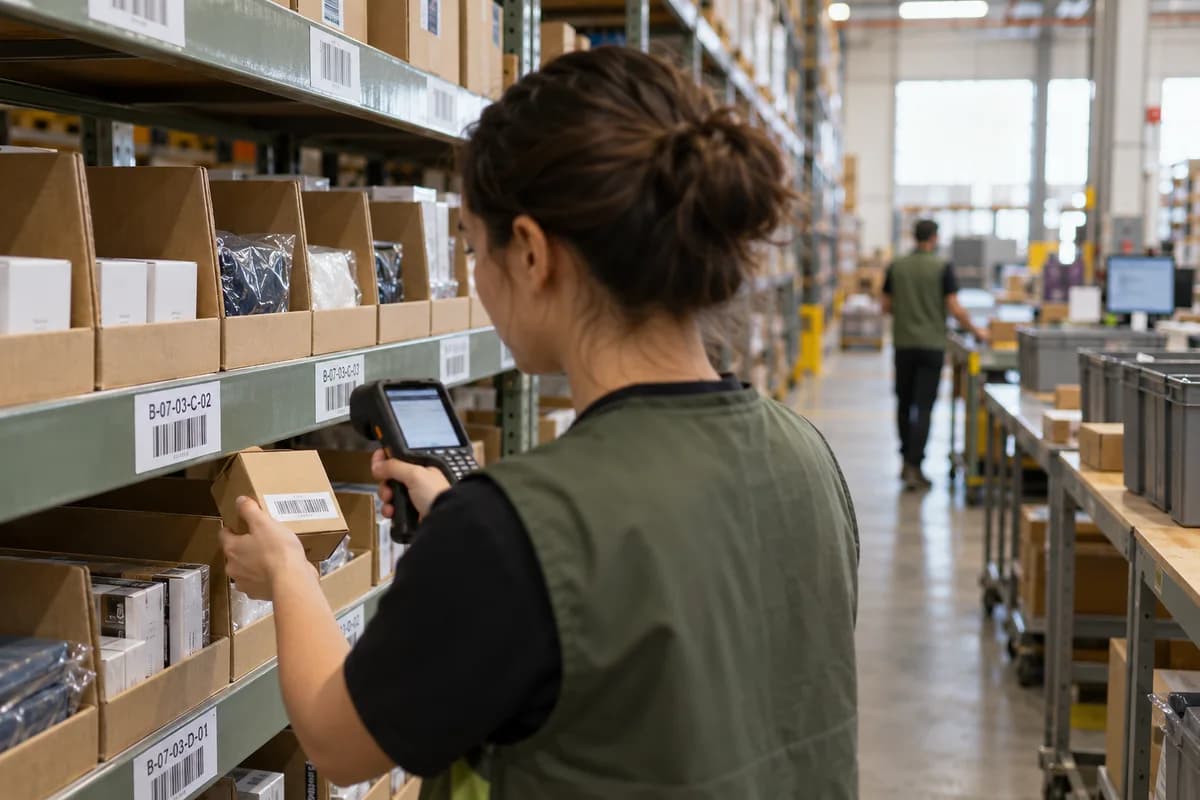
A bin code reads left to right like an address: zone, aisle, bay, shelf level, slot. B-07-03-C-02 means zone B, aisle 7, bay 3, level C, slot 2. Pickers stop thinking about it after a day.
Print the code as a Code 128 barcode with the human-readable text under it. Put labels on the shelf edge, not on the carton, because cartons move and shelves do not.
- Odd aisle numbers on one side, even on the other
- Levels lettered from the floor up, never numbered
- Reserved codes for the returns cage and the damaged shelf
- No reuse of a retired bin code for a year
Size bins by item class, not by habit
Sort the catalogue into classes first: flat apparel, small boxed items, tall bottles, fragile glassware, bulky cartons. Measure the real packed unit, not the product photo dimensions.
Then cut bin sizes to match. A bin that fits twelve phone cases wastes a shelf when it holds two kettles. Mixed-size bins invite pickers to stuff overflow into the wrong place.
Allow one bin per SKU in the pick zone. Hold the spare cartons above or in a reserve zone, and refill the front bin from reserve with a logged replenishment task.
- Shelf bins for items under a set weight
- Deep carton flow racks for the fastest lines
- Pallet slots for backstock only
- A clearly signed overflow zone with its own codes
Slot fast movers where hands and feet reach them first
Pull sixty or ninety days of order lines and rank every SKU by how often it is picked, not by units sold. A product bought in lots of fifty is picked once; a cable bought one at a time is picked constantly.
Put the most-picked lines between knee and shoulder height, closest to the pack benches. Keep heavy items low and light ones high. Put items that are often ordered together within a few steps of each other.
Re-run the ranking before each sale season. Last quarter’s favourite is often this quarter’s dead shelf.
Order the pick path as one walk through the building
Number zones in the sequence a picker walks them. A serpentine route goes up aisle 01, down aisle 02 and so on, so nobody doubles back or meets another picker head on.
The system sorts each pick list by bin code in that walk order. Batch several orders into one trip, then sort them at a put wall or cart with numbered slots.
Test the route with a stopwatch and a pen. Walk it with a real list of twenty lines and mark every place a picker pauses or backtracks. Fix the slotting there, not the software.
- Wave or batch picks by carrier cut-off
- Single-line orders on a separate fast route
- Heavy items picked first, fragile last
- A short list for bulk pallets handled by forklift
Scan every move so stock by bin stays honest
Accuracy slips during peak days because people skip steps. Make the scan the step. Put-away needs the bin label and the item barcode, a pick needs both, and a move between bins needs both again.
Block a pick when the item scanned does not match the line. Flag short picks straight away and send a cycle counter to that bin, rather than waiting for the monthly stock take.
Count a few fast bins daily and the whole building on a rolling schedule. Write down every adjustment with a reason code. Patterns in those codes show which bin or which person needs attention.
Bin location and pick path worksheet
This worksheet has three blocks on one page. The first block lists zone, aisle, bay, level and slot codes with bin size and item class. The second ranks the top fifty SKUs by pick frequency with their assigned bin. The third records the walk order of zones and the daily cycle count schedule.
Open a blank worksheet to printQuestions owners ask
How big should a bin be in an ecommerce warehouse?
Size it to the packed unit of the item class it holds, with a little air around it. Measure real cartons and polybags. A bin should hold a sensible refill quantity, not a whole year of stock.
Should each SKU have more than one bin?
Yes, usually two roles. A small front bin sits in the pick zone, and spare quantity waits in reserve. Replenishment moves stock from reserve to front and is scanned like any other move.
How often should we re-slot products?
Before each sale season and after any big change in the catalogue. Re-ranking by pick frequency takes an hour in a spreadsheet, and moving a few dozen lines is quicker than it sounds.
Do we need handheld scanners for this?
For stock by bin to stay accurate, scanning at the shelf is the right habit. Rugged handhelds or phones with a scanning app both work, as long as pickers cannot confirm a line without a scan.