In this guide 6 sections
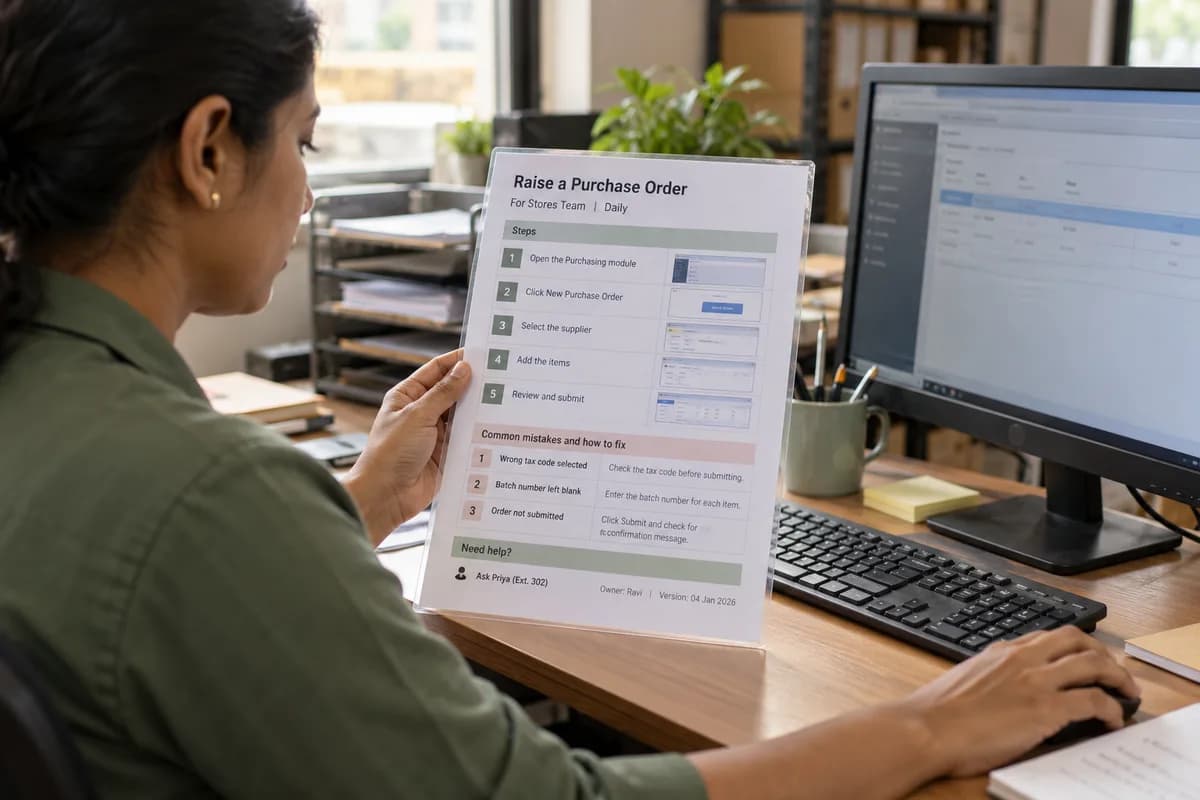
A good quick reference card fits one printed page. It carries the task name, who does it, numbered steps with screenshots, the three commonest mistakes and a named person to ask. Write it in the language used on the floor and keep it beside the screen.
Pick one task and one reader
A card covers a single task. “Raise a purchase order” is a card, while “Using the purchasing module” is a manual, and nobody reads a manual standing up at a busy counter. Pick a task done every day that people still get wrong, such as closing the cash drawer. Small beats complete.
Name the reader too. A card for the stores keeper differs from one for the accounts clerk, even when both touch the same screen, because each needs only the steps they perform. Keep it short.
Ask the supervisor which task draws the most questions at the desk. That task goes first.
Lay out the page in fixed blocks
Use the same blocks on every card so people learn where to look. Put the task name in large type at the top with the role beneath it, and keep the version date and an owner’s name in the footer. Print the same grid for every task. The whole pack then looks alike, which makes it quicker to scan when the queue is long.
The middle of the page holds the steps. Number them, keep each to one action, and put the button name in bold exactly as it appears on screen. A small screenshot beside each step helps the eye find its place.
The lower third holds the mistakes and the contact. People read this part only when something has gone wrong, so keep the type large enough to read at arm’s length. Never shrink it.
- Header: task name, role, frequency
- Steps: numbered, one action each
- Screenshots: cropped to the relevant buttons
- Mistakes: the three seen most often
- Footer: owner, version date, who to ask
Write the steps the way the floor talks
Use the words your staff use, not the vendor’s menu language. If the counter says “bill” and the screen says “sales invoice”, write both once, then use the floor word from there on. Mix local-language words with the English button labels where the screen is English. Plain words win every time.
Keep sentences short. “Scan the item. Check the price. Press F4.” beats a paragraph about the workflow. Start each step with a verb and stop at one action. Avoid abbreviations that only the head office understands, and spell out the code or screen name the first time it appears on the card.
Test the card on someone who has never done the task. Where they hesitate, the step is missing a detail, such as which tab holds the button. Watch their eyes, not their hands.
List the three mistakes and who to ask
Pull the mistakes from real tickets and supervisor notes, not from guesses. A typical card might warn that the wrong tax code was picked, the batch number was left blank, or the day was closed before the last receipt printed. Ask the helpdesk for a month of logged questions, or scroll the supervisors’ group chat, then tally them.
For each mistake, add one line on how to fix it or how to spot it early. Then write a real name and a desk or extension, never a department. People call a person. Names get calls.
If the same mistake appears on several cards, the screen may need changing, so pass that note to whoever owns the software and ask for a dated fix. Do not hide this block at the bottom in small type.
Print it, place it and keep it current
Print on A4 or letter, in black and white if screenshots stay readable, and laminate it or slip it into a clear sleeve. Stick it where the eye falls when the hand is on the mouse. A drawer is the wrong home. Keep a spare folder of master files so any supervisor can reprint a worn card within minutes, with the same layout and the same fonts as the original.
Set a review trigger: a software update, a changed form or a new joiner’s question. When the trigger fires, the owner checks the card against the screen and reprints it. Remove the old copy from every desk. Old cards cause errors.
Write your first card this week. Choose the task, fill the five blocks, and test it with one new colleague before printing. Then repeat for the next task.
One page quick reference card template
A single page in five blocks. The header holds the task name, role and how often it is done. The step block has numbered rows, each with an action line and a screenshot slot. A mistakes block lists three entries with a fix beside each. The footer carries the owner, the version date, the reviewer’s initials and the person to ask.
Open a blank worksheet to printQuestions owners ask
How many steps should one card have?
Try for eight or fewer. If the task needs more, it is probably two tasks. Split them into two cards so each fits one page and one glance.
Should the card include screenshots?
Yes, small ones cropped to the buttons being used. Full screen captures hide the detail. Recapture them whenever the screen changes so they never mislead.
Who should write the card?
A supervisor or an experienced user who does the task daily. A trainer or analyst can format it, but the steps should come from someone who knows the real shortcuts.
Can the card be digital instead of printed?
It can, and phone staff may prefer that. For desk work, paper beside the screen is quicker because nobody has to switch windows.