In this guide 6 sections
Perpetual licences are bought once and kept. Term licences expire. Named user licences belong to one person, concurrent licences cap simultaneous sessions, and site licences cover a place or an organisation. Each type changes what an order, a key and a renewal must record.
Perpetual and term licences differ in what ends
A perpetual licence lets the buyer run one specific version for ever, though the buyer owns only the right to use it and never the code behind it. Updates and support cost extra.
A term licence ends on a date. It may run for a month, a year or three years, and it stops working unless somebody renews it in time. The order records the start, the expiry and the edition, and the key either carries the expiry or points to a record that does.
Catalogues often mix the two. A buyer may hold a perpetual licence for version nine plus a one-year maintenance term, and those belong on two order lines, not one.
- Perpetual: version, purchase date, maintenance end date
- Term: start date, end date, edition
- Both: buyer, reseller and order reference
Named user licences follow a person
Named means one person. A named user seat belongs to one individual, such as designer@studio.example, and can move from a leaver to a new hire once the old name comes off. The account or key lists every assignee by name and the date each seat was last reassigned, which is the first thing an auditor asks to see.
Offer a reassign button, because staff change. Run a quarterly check of who holds which seat, because leavers keep seats busy for months and the buyer starts to wonder what the invoice is paying for.
Concurrent licences count who is signed in right now
A concurrent licence caps simultaneous sessions, not people. Twenty seats may serve sixty staff, because only twenty are signed in at one time and the rest are working elsewhere. A licence server hands seats out and takes them back, so the key points at that server and not at any one machine.
The order records the pool size and the server or tenant it belongs to. Expect a support call the first time the pool runs dry at nine on a Monday morning, with a queue of people staring at a refusal message. Decide in advance what happens then.
Log peak usage each month. That log is the evidence for a bigger pool at renewal, and the evidence a vendor needs to explain why a smaller pool is enough.
Site licences cover a place or an organisation
A site licence covers every user in a defined place, such as one campus, one plant or one legal entity. Its boundary matters more than its count. A school with two campuses may need two site licences, or a single organisation licence that names both addresses and states how many staff it covers.
The order names the site, its address or legal entity, any cap such as staff headcount, and the date the licence was last confirmed with the buyer. Disputes start when the buyer opens a new branch or buys another firm, so record each one with a date, because the boundary moved that day.
- Site name, address or legal entity
- Headcount or device cap, if any
- Domain, IP range or licence file
- Date the buyer added a branch
Set the record fields before you list the first product
Choose the type per product. Every type needs a different set of fields on the order, the key and the renewal notice, and adding them later means writing to every buyer.
A term renewal notice shows the end date and the seats. A named user notice lists the assignees. A concurrent notice shows peak usage. A site notice shows the boundary.
Write one sample row per type. Then test whether your order form can hold every field in each row, because forms built for one licence type usually cannot.
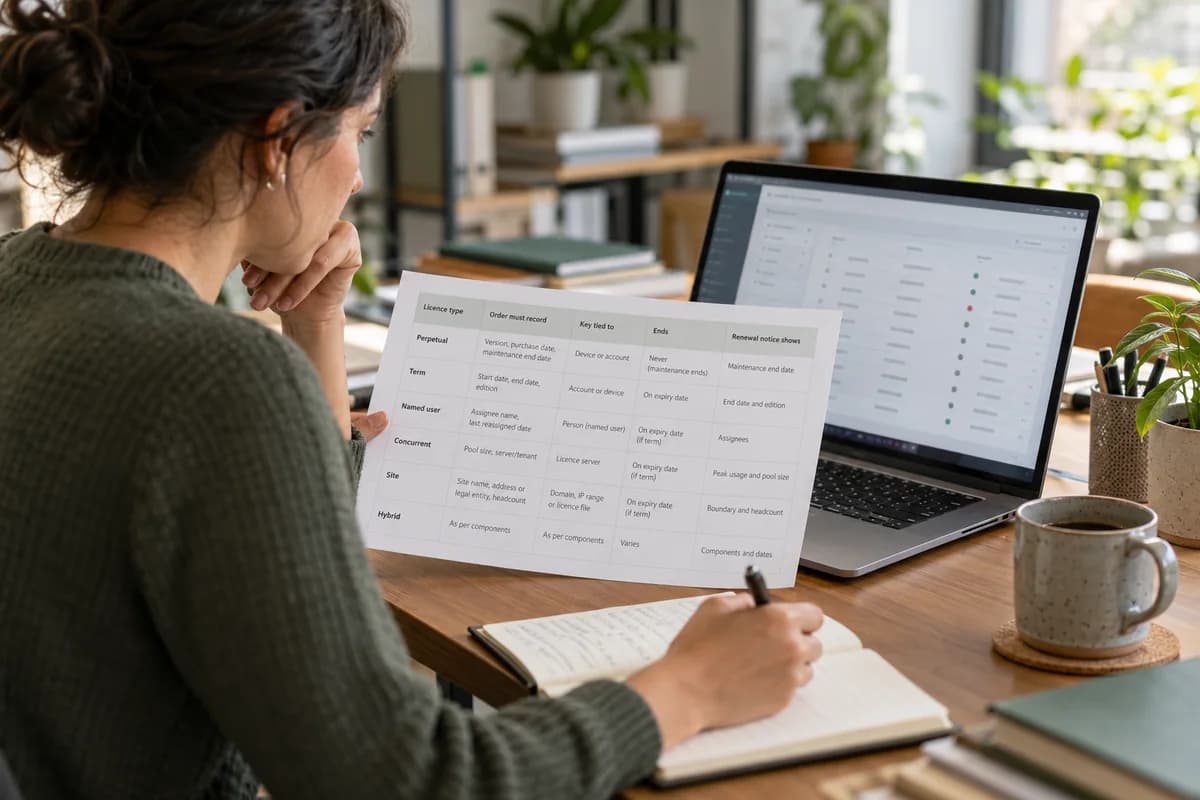
Licence type record sheet
A one-page table, one row per licence type. Columns show what is sold, the fields the order must hold, what the key is tied to, when it ends, the renewal trigger and what the notice must show. A blank sixth row covers hybrids, such as a perpetual licence bundled with a term support plan.
Open a blank worksheet to printQuestions owners ask
Is a subscription the same as a term licence?
Mostly, because both end unless somebody renews them. A subscription usually bills in monthly or yearly cycles and may include hosting and updates, while a term licence can be paid once for the whole term. Keep the same record: start, end, edition.
Which licence suits a team that works in shifts?
A concurrent pool often fits shifts, because day staff and night staff rarely overlap, whereas named seats would count every person on both rosters. Check the vendor’s terms first. Some vendors limit concurrent use to one site.
Can a perpetual licence be resold?
That depends on the vendor’s agreement and on the law where you live, so read the terms and ask the vendor before you promise a buyer anything. If transfer is allowed, log the new owner. Retire the old key.
What should a licence key be tied to?
That depends on the type. A named user key ties to a person, a concurrent key to a licence server, and a site key to a domain or a file. Term keys also need an expiry the product can read.