In this guide 6 sections
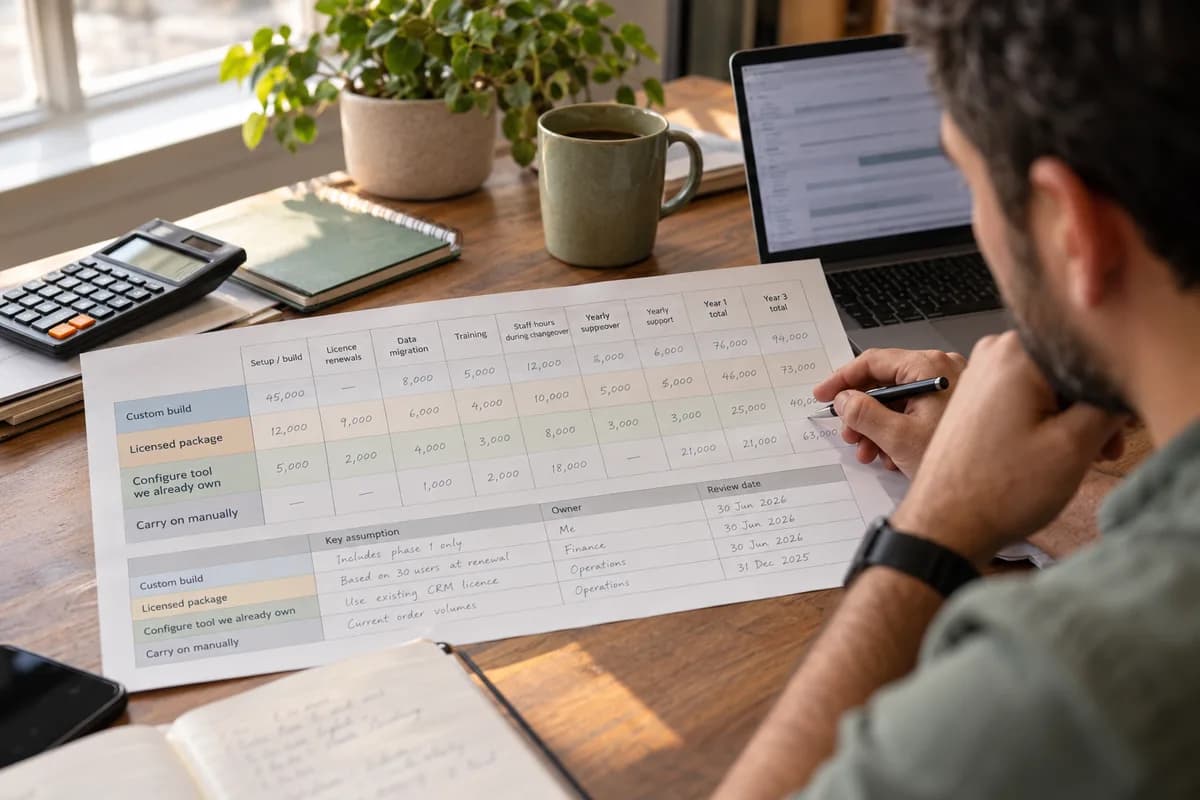
Cost each route in one table with identical columns: setup or build, licence renewals, data migration, training, staff hours during changeover and yearly support for the following three years. Add a fourth row for carrying on manually. The cheapest quotation is rarely the cheapest route.
Four routes, one table
Owners compare a build with a package. Then they stop. That drops two routes that often win: configuring a tool the business already pays for, such as the ledger or a form builder, and carrying on with spreadsheets. Give each its own row.
No row, no weighing. Use identical columns for every route. A quotation showing one figure tells you the build cost and nothing about renewals, data migration or the weeks your own staff will lose to workshops.
Enter a range where you are unsure. Never leave a cell blank. A blank reads as zero when the totals are added at the end, and a hopeful zero will flatter the cheapest route.
- Row one: custom build
- Row two: licensed package
- Row three: configure a tool you own
- Row four: carry on manually
Columns people forget
Licences renew. A per-seat package priced for ten users looks very different once the sales team grows to thirty and the warehouse supervisors and finance clerks also need logins. Costs shift again when the vendor moves single sign-on and audit logs into a dearer tier, so ask what each tier includes. Get renewal terms in writing.
Migration is the second gap, because customer masters, open purchase orders, opening stock balances and SKU codes all need cleaning before they load. Duplicate customers, mixed phone formats and half-filled addresses stretch a one-day import into weeks of checking, because each exception needs a person who knows the customer.
Training is third. Output dips while staff learn. For several weeks two systems run side by side, and every sales order is keyed twice, once into the old sheet and once into the new screen. Count those hours.
- Per-seat licence growth
- Cleaning and loading old records
- Training hours by role
- Parallel running of old and new
- Yearly support and upgrades
Count your own people’s hours
The vendor never quotes the time your team spends writing requirements, answering questions, testing builds and signing off each stage. For a custom build, that fills a quarter. Ask who must be free, and when.
Put a rough value on those hours. The accounts manager who gives a build six hours a week is not free, because her month-end close still falls to somebody else, usually late on a Friday.
The manual route hides the same bill. A dispatcher who re-keys orders from WhatsApp into an Excel sheet, then phones a driver to confirm each load, costs money daily. No invoice records it.
Where each route usually wins
A package suits a process that looks like everyone else’s, such as payroll, bookkeeping or basic email campaigns, where the vendor has already met every awkward case. Configuring a tool you own suits small gaps, like an approval step before a purchase order or a new report for the stock controller. The data is already there.
A custom build earns its place when the process sets you apart, or when three packages would need bolting together with CSV exports and fragile macros. Quote it in phases. Stop after the first if the numbers disappoint.
Carrying on manually is a real answer when order volume is low and errors are rare, such as a workshop taking a dozen phone orders a week. Say so in the table. Then add the date you will look again, so a choice that suits twelve orders a week never goes stale unnoticed once volumes climb.
Choose without bias
Ask two people to fill the table separately, one who favours building and one who favours buying, then compare their cells line by line. The gaps expose one assumption. Argue about those cells only.
Run totals over three years. Year one favours packages and manual work, while years two and three expose renewals, hosting and annual support, and the ranking often flips. Show all three columns.
Pick a route. Write the review date on the table. Then hand the quotations to a trusted outsider, such as your auditor, and ask them to check every cell against its source document.
Build, buy or configure cost table
One printed worksheet with four rows. The rows are custom build, licensed package, configure an owned tool and carry on manually, so every route sits on the same sheet as its rivals. Columns run across for setup cost, licence renewals, data migration, training hours, staff hours in changeover, yearly support, year one total and year three total. A final strip records the assumption behind each row, the owner of that assumption and the date when someone will review it again with fresh quotations.
Open a blank worksheet to printQuestions owners ask
Is configuring a tool I already own really a separate route?
Yes. Many firms pay for a CRM or ledger and use only the contact list and the invoice screen, ignoring custom fields and workflows already included in the licence. Adding fields, approval steps and reports to that tool often costs far less than a new system, provided it can hold your data.
How do I cost the manual route?
Count the hours spent re-keying, chasing and correcting, then multiply by the loaded hourly cost of those staff, using a week of honest tallying. Add known mistakes. A wrong invoice, a double booking and a missed delivery all belong in the row, each with the hours and goodwill it cost to put right.
Why look three years ahead?
Package prices move at renewal, custom builds need yearly support, hosting and fixes, and a one-year view hides all of it behind the launch costs. The cheaper route can lose by year three.
Who should own the table?
The person who answers for the result owns it, usually the owner or finance head, who can overrule any enthusiast and sign every assumption. Vendors can supply figures. They should never draw the comparison.