Point of Sale Billing for Supermarkets
Record counter sales, payments and the resulting stock movements.
Does this function belong in your operation?
Use when staff complete customer purchases at a physical counter.
A customer completes an in-person purchase.
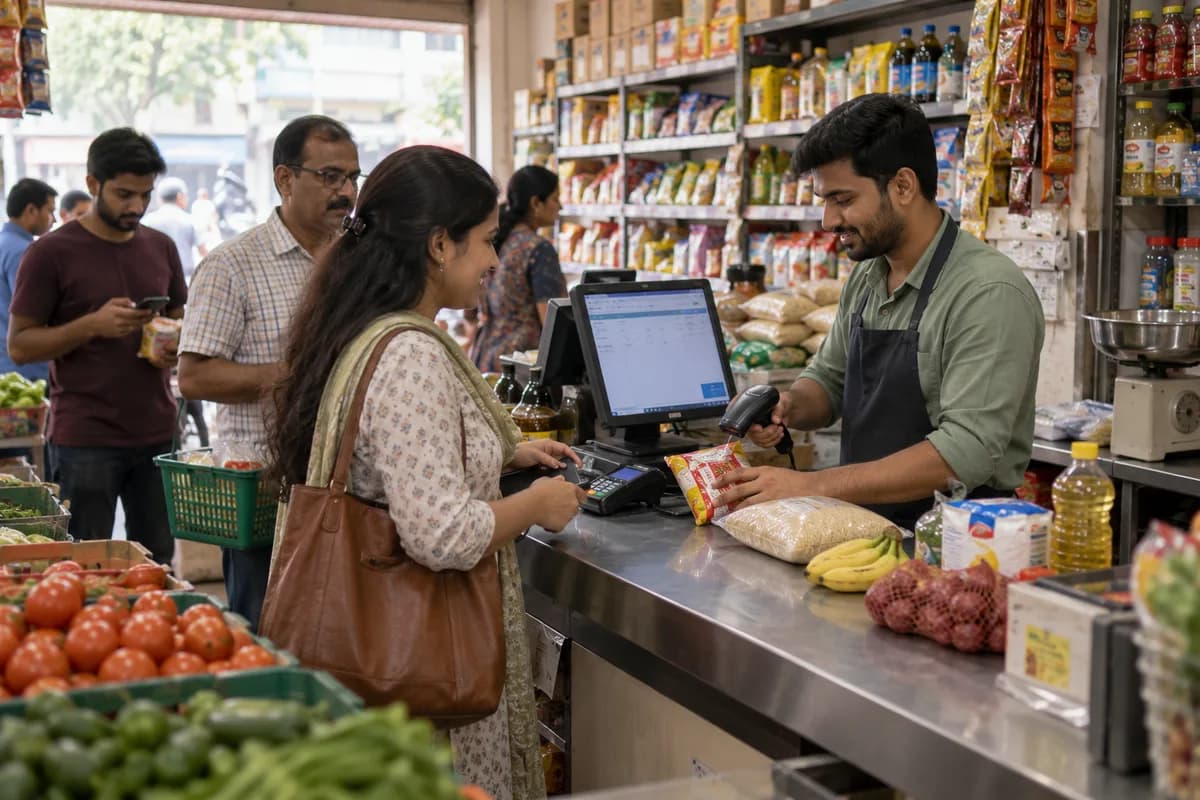
Cashiers scan baskets, weigh loose fruit and take cash, card or wallet in split payments. Held bills let a queue move while a customer fetches a forgotten item. Receipts print with the loyalty balance.
Bring the records the workflow depends on.
- Item catalogue and prices
- Payment methods
- Counter and receipt settings
Outputs to check
- Counter bill and tender record
- Shift settlement statement
- Return and discount exception log
Follow the point of sale billing workflow.
Use this sequence to compare your current process with the proposed module. Agree the owner, permission and exception at each step.
Who uses the module, and who approves?
Keep responsibilities distinct even when one person holds more than one role.
Decide how exceptions are handled.
These business rules belong in configuration and testing. A normal transaction alone does not demonstrate that the workflow is ready.
Can this work independently?
POS needs item, price and tax settings. It can record permitted tenders independently, but payment terminals or gateways require supported connections and separate settlement checks. Stock, loyalty and customer accounts are optional handoffs; a printed bill does not prove a card payment settled.
Systems and records it connects with
- Product management: Item identifiers, units and controlled variant definitions.
- Stock tracking and alerts: Item-location quantities and authorised stock movements.
- Barcodes and labels: Item-code mappings and verified printed-label values.
- Loyalty and offers: Eligible rewards, redemptions and approved reversals.
Configure, test and introduce the workflow.
- We spend time at your counter and note how bills are made. You get a short written note of the layout we propose. The queue tells the story.
- Import a checked item list with rates and approved tax settings. On the intended counter hardware, test ordinary sales, discounts, split tenders, failed payments and returns. Review usability and reconcile the resulting totals before release.
- Who may give a discount and who may take a return is fixed. Each cashier is given a personal login. The counter bills on the system and the day is closed with a cash tally. The owner reads the first closing report with the cashier. Leave room for surprises.
Check the result before rollout.
Apply these checks to a sample from the agreed workflow, then repeat with an exception. Keep the expected result beside the test record.
- Bills total the correct items and prices.
- Split payments reconcile to the bill.
- Counter closing highlights differences.
How the business operates.
A supermarket lives or dies between the delivery bay and the checkout lane, where a warm chiller or a wrong shelf label ends in a till dispute. Fresh lettuce, coriander and bananas turn in days. Packaged goods carry dates that cannot be missed. Prices change weekly.
The records that hold the operation together.
- Item master and labels. Keep every product with its barcode, unit, department, supplier and tax setting, and print shelf-edge labels and weighing-scale labels from the one record. No aisle strip disagrees with the till.
- Lane billing. Scan or weigh at the lane, apply offers, split payment across cash, card and vouchers, and park a basket when a shopper walks back for a forgotten carton of milk.
- Weighed and loose items. Price produce, deli and bakery lines by weight through price lookup codes, with a scale label or a lane scale, and keep the net weight printed on the bill.
- Batch and expiry. Receive chilled, dairy, bakery and packaged lines by batch with a date, then list what falls due by department. Markdown stickers are planned before the oldest stock reaches the front.
Operational bottlenecks to check
Shelf expiry dates are checked by eye
Dairy shelves get a glance each morning. A short-dated carton of yoghurt that should have gone to markdown last week is found by a customer holding it at the lane, not by staff.
Shelf price and till price disagree
A multi-buy offer ends on Sunday. The endcap ticket stays up until Tuesday. The customer points to the shelf edge, the cashier points to the screen, and the manager approves a discount just to clear the queue behind them.
How work flows across this business
This module sits within a wider operating process. Use the sequence to identify the other teams and records affected by a change.
1. Item set-up
A new product is added with barcode, department, pack size, tax setting, supplier and shelf location, and the shelf-edge label prints from that same record. The till reads that record too.
2. Purchase order
Buyers raise orders to suppliers, distributors and local producers from sales and stock levels, and each order goes out by email or messaging with the agreed case rate. The delivery day is printed on it.
3. Receiving
Cartons are counted against the delivery note, short or damaged cases are noted, and chilled goods are probed with a thermometer before the driver leaves. Perishable batches go in with their dates.
4. Shelf and promotion
Stock moves from the backroom to the shelf with the oldest batch forward. Price changes and multi-buy offers start and end on their set dates, and shelf labels for the affected bays are reprinted that same day.
5. Checkout
Cashiers scan and weigh, apply offers, take cash, card or vouchers and add loyalty points at the belt. At shift end, the cashier counts the drawer and the card terminal batch is settled before the lane closes.
6. Markdown and wastage
Items nearing their date are marked down by department with a coloured sticker. What cannot be sold is written off with a reason, and the loss is read against that department’s sales.
Industry reports to connect with
- Sales by department, product group and hour of the day
- Batches due to expire this week, by department
- Wastage by reason, department and week
- Deliveries received against orders, with short supply
Questions before implementation.
When should supermarkets consider point of sale billing?
Use when staff complete customer purchases at a physical counter. A customer completes an in-person purchase.
What should we bring to the requirements discussion?
Bring anonymised examples of Item catalogue and prices; Payment methods; Counter and receipt settings. Show who creates, checks and changes each record. Use only records from an activity that meets the suitability conditions above.
Does this replace our existing business software?
The starting point is your current system and the gap you need to close. Record counter sales, payments and the resulting stock movements. Configuration, a connected module or a custom build are evaluated against that gap before a replacement is proposed.
What is outside this module?
Payment hardware, offline operation and tax requirements need explicit scope confirmation.
How are scope, price and rollout decided?
The proposal follows a review of your records, user roles, branches and existing software. Data migration, connections, training and support are scoped separately where needed. Bills total the correct items and prices. Use this check when reviewing the first working version.
Related functions for supermarkets.
Discuss point of sale billing for your business.
Tell us which workflow needs attention and which systems your team uses. The next step is a requirements discussion and a written scope.
What happens after you share your requirements
- We review your brief and the systems you already use.
- We clarify the workflow, missing information and the work to consider first.
- The proposed scope sets out the deliverables, responsibilities and dependencies.
- Review the scope and commercial terms before deciding whether to proceed.
Start with your requirements
Describe your current process, the people involved and the change you need. Start with the details you know; we can clarify the rest together.
Share your requirements