In this guide 6 sections
Choose five people who will really use the software, give each a real task such as raising a credit note, and stay quiet while they try. Note every pause and wrong click. Finish with a single-sheet ranking of changes, sorted by how many users stumbled.
Choose five real users, not five friendly ones
Pick people who do the job today: a dispatcher, an accounts clerk, a branch supervisor. Include one slow typist and one person who dislikes change. The cheerful power user forgives everything and teaches you little.
Five is enough. The same problems repeat. Book thirty minutes each, away from their desk, with a laptop or tablet showing the clickable prototype. Tell them you are testing the design, not them.
Write tasks from real paperwork
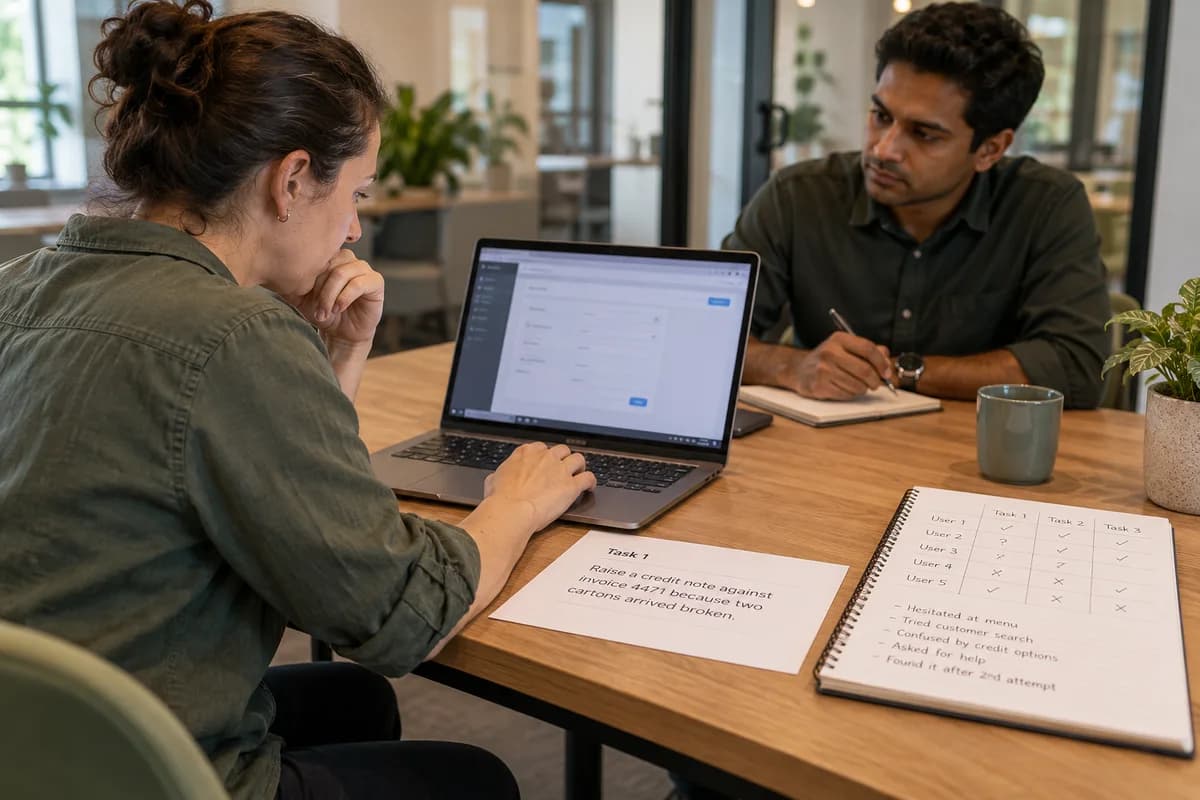
A task must be something that happened last week. Raise a credit note against invoice 4471 because two cartons arrived broken. Find every unpaid order for one customer. Reassign a service call to another technician.
Print each task on a card with the data they need, so nobody has to invent numbers. Keep button and menu names out of the wording. If the card says “click Reports”, you learn nothing about whether they could find Reports.
- Three or four tasks per person, in the same order
- Real customer names and amounts from old records
- A stated finish line, such as credit note number shown
- One easy task first to settle nerves
Say nothing and watch the cursor
This is the hard part. When someone hesitates, count to ten silently. If they ask where to click, answer with “What would you try?” Let them get lost. That is the data. Write it down.
Record the screen if they agree, and keep a sheet with one line per task. Note the wrong turns, the long pauses, the muttered words and the moment they ask for help. A frown at a field label is worth writing down.
Ask three questions afterwards
Once the tasks end, ask what felt confusing, what felt missing and what they would show a new colleague first. Keep it short. Stay quiet again. People are polite and will praise the design unless you ask for the sticking points.
Thank them and leave the prototype alone for a day. Then read your notes while the memory is fresh, and mark each problem with the participant numbers who hit it.
- What confused you most?
- What did you expect to find and could not?
- Which screen would you change first?
Turn notes into a ranked list
Build a table with problem, screen, how many of five users stumbled, and the proposed fix. A problem that stopped four people goes to the top. A cosmetic gripe from one person goes to the bottom.
Hand the list to the designer and agree which fixes land before development. Retest the worst two with three fresh users. Approve the build only when every top problem has a fix or a written decision to live with it.
Prototype test observation sheet
A one-page grid with a row per task and columns for user one to five, each holding a tick, a hesitation mark or a wrong turn. Below it sits a ranking table: problem, screen, users affected out of five, proposed fix and owner.
Open a blank worksheet to printQuestions owners ask
Why only five users?
The same obvious problems show up again and again after the first few sessions. Five people from different roles expose most of them. Run a second round after fixes instead of a larger first one.
Can I test with a paper sketch?
Yes for early layout ideas. For approval before a build, a clickable prototype is better because people can attempt a whole task, not just comment on pictures.
Should the designer sit in the room?
Ideally they watch, silently, or view the recording later. If they hover and explain, users will start asking them for help and the test loses value.
What if staff say they like it but struggle?
Trust the struggle. Count hesitations and wrong clicks instead of opinions. Polite comments often cover real confusion, especially when the boss runs the session.