Business solutions for Eye hospitals
Explore software for work such as “Cataract and lens choices”. Review each business function below, including when it fits and what to check before implementation.
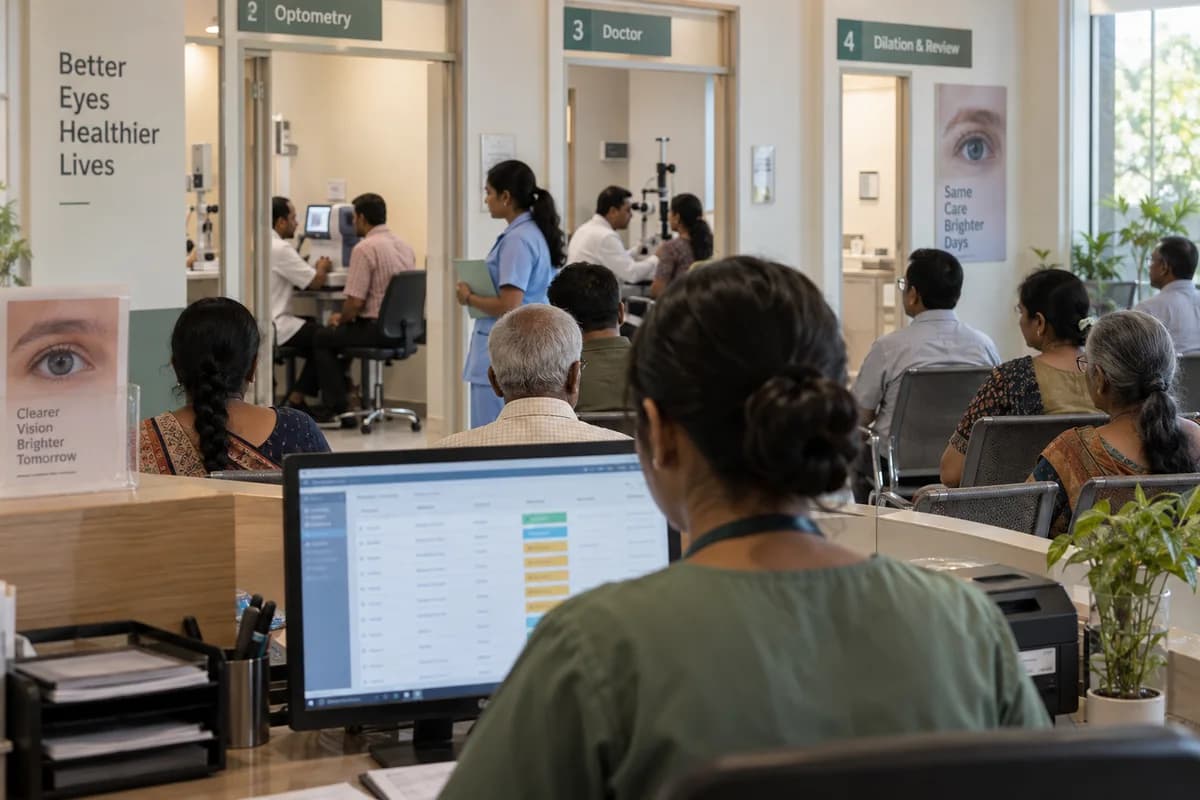
How the business operates.
An outpatient eye clinic moves in stages: registration, vision and refraction, a pressure check, the doctor’s exam, then dilation and a second look once the drops have acted.
The records that hold the operation together.
- Patient, visit and eye-specific examination record
- Queue position and clinician-directed dilation status
- Approved surgery plan, lens model and power
- Lens serial or lot, consignment and patient-use record
- Optical prescription, spectacle order and collection status
Operational bottlenecks to check
Refraction is written twice
The optometrist’s readings are copied into the doctor’s notes and again at the optical counter. Each copy invites a mistake.
Dilated patients lose their place
Patients sent for drops rejoin the queue on someone’s memory, and the token order breaks down. Nobody knows who is ready.
Lens stock does not match the theatre list
Intraocular lenses come in different models and powers, some on consignment from the supplier, and a used lens is not always recorded against the patient. Counts drift every month.
Camp patients fall away
Patients screened at a camp are listed on paper, and those advised surgery are not called back. Nobody owns the follow-up list.
Spectacle orders go astray
The lab order, the advance paid and the promised delivery sit in a book at the optical counter. Customers call to ask.
Follow the work across teams.
This is a planning flow. Confirm the steps, owners and approval rules against your actual operation.
Roles and responsibility boundaries.
Reports your managers need.
- Visit and queue status by work area
- Approved theatre list and outstanding preparation items
- Lens stock, consignment and patient-use reconciliation
- Optical orders and insurer balances awaiting action
Connections to scope
- Diagnostic systems: authorised access to eye-specific reports and images
- Accounting and billing: approved charges and receipt references
- Optical laboratory: approved order and delivery status
Confirm data access, record ownership and the exchange method for each connection. Inclusion here does not mean every connection is available in a standard package.
Setup decisions and adoption risks.
Use these requirements to plan phases, data migration and user training. Agree the release sequence after reviewing your current systems.
Limitations to settle before implementation
- Diagnosis, lens selection, treatment, urgency and clinical follow-up decisions remain with qualified clinicians.
- Equipment connections, image viewing and insurer interfaces require explicit scope and access approval.
Modules to consider first.
These functions connect to the operating model above. Confirm each one against the work your business actually runs.
Choose the operation you want to improve.
Use these activities to explain your scope. Your business does not need every function in the directory.
- Cataract and lens choices
- Retina and diabetic eye services
- Glaucoma care
- Cornea services and transplants
- Paediatric eye care
- Refractive surgery
- Eye emergencies and injuries
Explore the business functions.
Production, stock, fleet and recurring billing functions apply only where your business runs those activities. Read the suitability conditions on each page.
Bookings and Appointments
Platform
Audit Trail
Record who changed important business data and when.
View workflow and suitability →Roles and Permissions
Control which records and actions each user can access.
View workflow and suitability →WhatsApp, SMS and Email Notifications
Send business messages from approved events and recipient rules.
View workflow and suitability →
Finance & Accounting
Human Resources
Inventory Management
Start with the problem your team can describe.
Bring a sample record and show where information is copied, missed or waiting for approval. Scope the first useful change from there.
What happens after you share your requirements
- We review your brief and the systems you already use.
- We clarify the workflow, missing information and the work to consider first.
- The proposed scope sets out the deliverables, responsibilities and dependencies.
- Review the scope and commercial terms before deciding whether to proceed.
Start with your requirements
Describe your current process, the people involved and the change you need. Start with the details you know; we can clarify the rest together.
Share your requirements