Cloud Migration Services for Multiple Systems
Cloud migration services cover businesses with several systems to move. An assessment decides what moves, what is retired, what stays in place and in what order the rest travels.
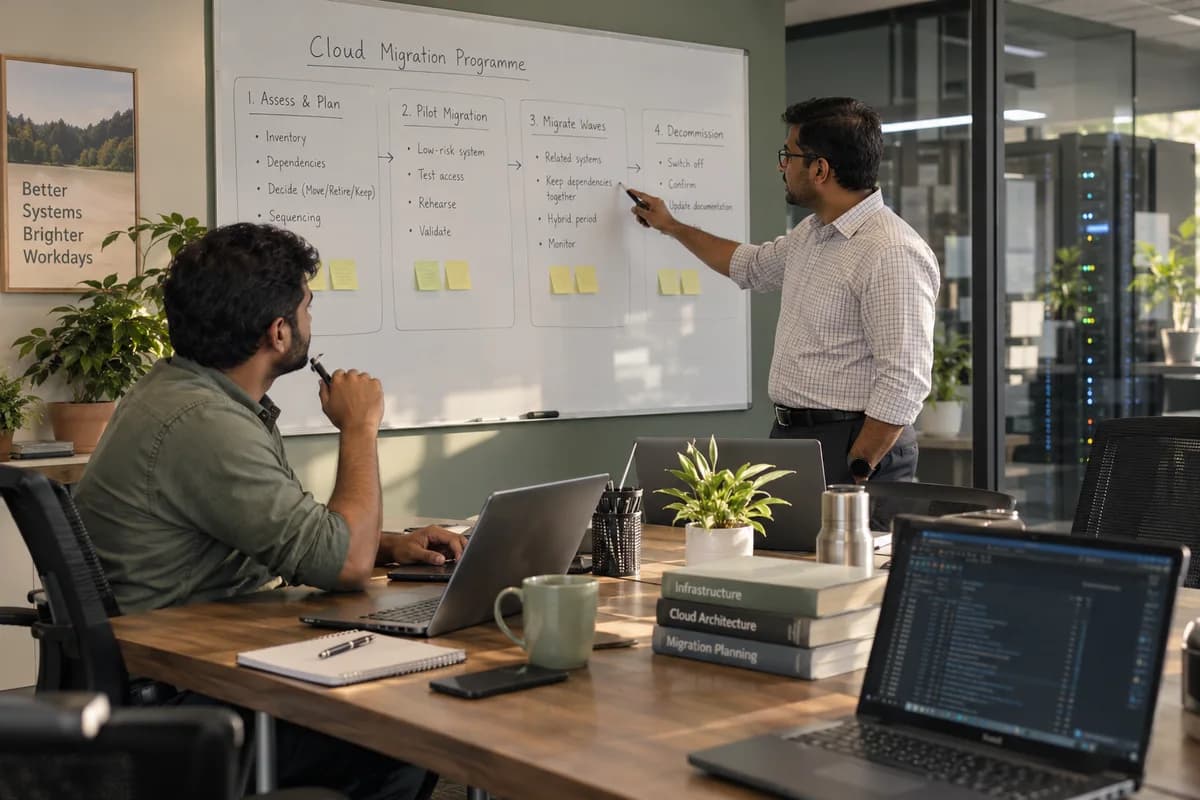
Why the inventory changes the plan
Before anything moves, every server, database, scheduled job and shared folder is listed with what depends on it. Two systems may do the same job. One may be unused since its owner left. A third may wait on a licence question with its vendor.
How a programme is sequenced
Choosing the destination
- Licensing you already hold, which can outweigh a technical comparison
- Data residency requirements from customers or your sector
- Who will operate the systems afterwards and what that team knows
Seven outcomes for each system
AWS’s large-migration guidance sorts each application into one of seven outcomes. The assessment assigns every system to one of them.
What the assessment produces
- A list of systems with an outcome for each and the reason
- Dependencies drawn between systems, networks and outside services
- A wave plan with order, owners and rehearsal dates
- A risk list covering licences, data residency and downtime windows
- A rough cost comparison between staying and moving
Common reasons programmes stall
Questions for a multi system migration partner
- How do you find dependencies we have forgotten?
- What happens to systems you advise us not to move?
- Who signs off each wave?
Migration waves as the business lives them
A migration programme moves systems in waves. Every wave lands on a different group of people. Waves differ in size. Operations, the app owners and support all have a part.
Questions to settle before rollout.
Use a representative scenario to decide what this part of the system must show and where review is still needed.
Cloud Migration Services for Multiple Systems
Which differences must be resolved before the old system is retired?
For “Cloud Migration Services for Multiple Systems”, compare a sample of linked records and control totals across the old and new systems. Assign an owner to every unexplained difference before cutover.
Background reading: AWS: source and target validation
Frequently asked questions
Do cloud migration services mean moving everything?
No. Some systems are retired, some go to a managed platform and some stay where they are. The assessment decides each one.
Can part of our setup stay on-premise?
Yes. A hybrid arrangement is common where an ERP or shop-floor machine cannot move, and the link between the two halves is designed as part of the plan.
What if our application code is old?
That assessment comes first. Some old code moves unchanged, some needs a runtime upgrade, and some is better left as it is.
Will you support the systems after they land?
Yes, if you want that after the move. Some businesses take over with the documentation, and others keep a managed arrangement with us.
How long does a multi-system migration take?
It runs as a programme over months, not days. Each wave has its own rehearsal and window. A calendar based on your systems comes out of the assessment.
Is lift and shift a bad idea?
Not by itself. It is the safest first step, because it moves risk out of the old data centre quickly. Savings from redesign can follow once the systems are stable.
What does it do to our staff?
Teams need time for testing and sign-off in each wave. Training on the new environment is planned alongside, so people are not learning during a cut-over.
Should we modernise applications while we migrate them?
For large programmes the usual advice is to move first and modernise afterwards. Combining both multiplies the number of things that can go wrong. Exceptions are systems that cannot run on the new platform as they are.
Tell us what you need.
Tell us what your team does today, where work gets stuck and what you want to change.
What happens after you share your requirements
- We review your brief and the systems you already use.
- We clarify the workflow, missing information and the work to consider first.
- The proposed scope sets out the deliverables, responsibilities and dependencies.
- Review the scope and commercial terms before deciding whether to proceed.
Start with your requirements
Describe your current process, the people involved and the change you need. Start with the details you know; we can clarify the rest together.
Share your requirements