Email and Ticket Sorting With Draft Replies
Email and ticket automation reads incoming items and sorts them before anyone opens them. Type and urgency are identified, the customer record is attached, long threads are summarised and a draft reply is prepared.
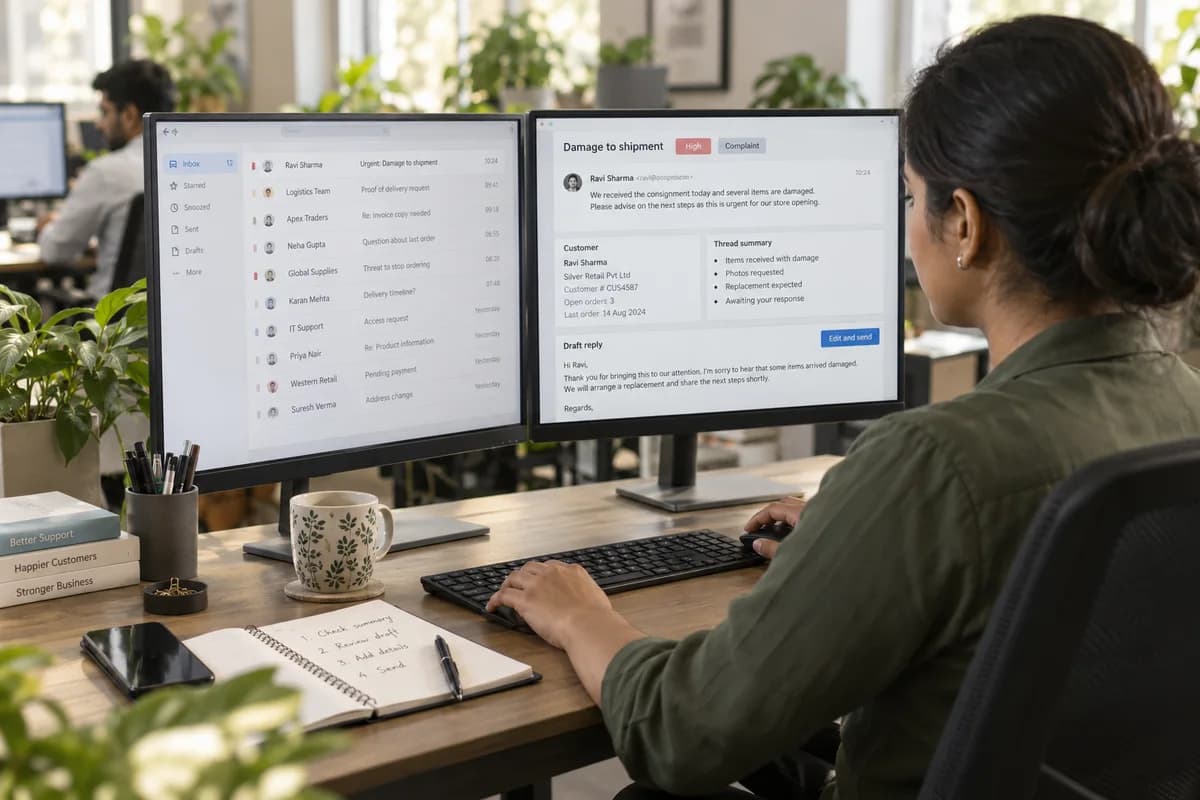
Different mail in one inbox
A proof of delivery request, an invoice copy request, a damage complaint and a threat to stop ordering can all land in one inbox. In a list they look alike. Sorting on arrival puts the urgent item ahead of the routine ones. That is the purpose of this work.
What is prepared before an agent looks
Nothing sends itself
Replies wait for an agent. Automatic sending sounds like the obvious next step, and it is where these systems tend to go wrong in public. The gain lies in the time before the reply, not in removing the person who writes it. Acknowledgements are the one exception, and even those stay factual.
Frequently asked questions
Will ticket automation send replies to customers on its own?
No. Drafts are prepared and an agent sends them. Only a plain acknowledgement of receipt can go out automatically, and only if you ask for it.
Does this work with our existing helpdesk?
Where it has an API, yes, and the classification is written back as fields in the tool your team already uses. For a shared mailbox with no helpdesk, the same sorting can be applied to folders and labels.
How are the categories decided?
From your recent mail, grouped and then agreed with your support lead. The resulting list often differs from the one people assume, which is a useful finding in itself.
What if it labels something wrongly?
The agent corrects it in a click, and the correction is kept for retraining. Nothing is hidden on the basis of a label, so a misfiled mail is still in the queue and not lost.
Tell us what you need.
Share your requirements and one of our engineers will come back to you within one business day.
What happens after you share your requirements
- A senior engineer reads your answers. Nobody phones first.
- Within one business day you get a written note: what we understood, what we would start with, and the questions we still have.
- If it fits, a proposal follows with the order of work, what we need from you and what you receive at each step.
- No call is booked and nothing is paid until you have read the note. Your details stay with us.
Start with your requirements
Seven short steps that tell us what you need. A senior engineer reads them before anyone gets in touch.
Share your requirements