One merchant file for onboarding, pricing, payouts, reserves and disputes.
Manage merchant onboarding, rate cards, settlement batches, reserves, refunds, reconciliation and chargebacks in one system beside your gateway. Each merchant carries its papers, its pricing and its balance from application to every payout. Onboarding analysts, risk, support and settlement accountants open the same file. The payment engine keeps authorising and routing, and funds move through your existing licensed arrangements.
- Your rate cards, reason codes and approval limits entered as you operate
- Merchant files, open reserves and open disputes migrated
- Changes to pricing rules and approval steps handled by GullySystem staff when asked
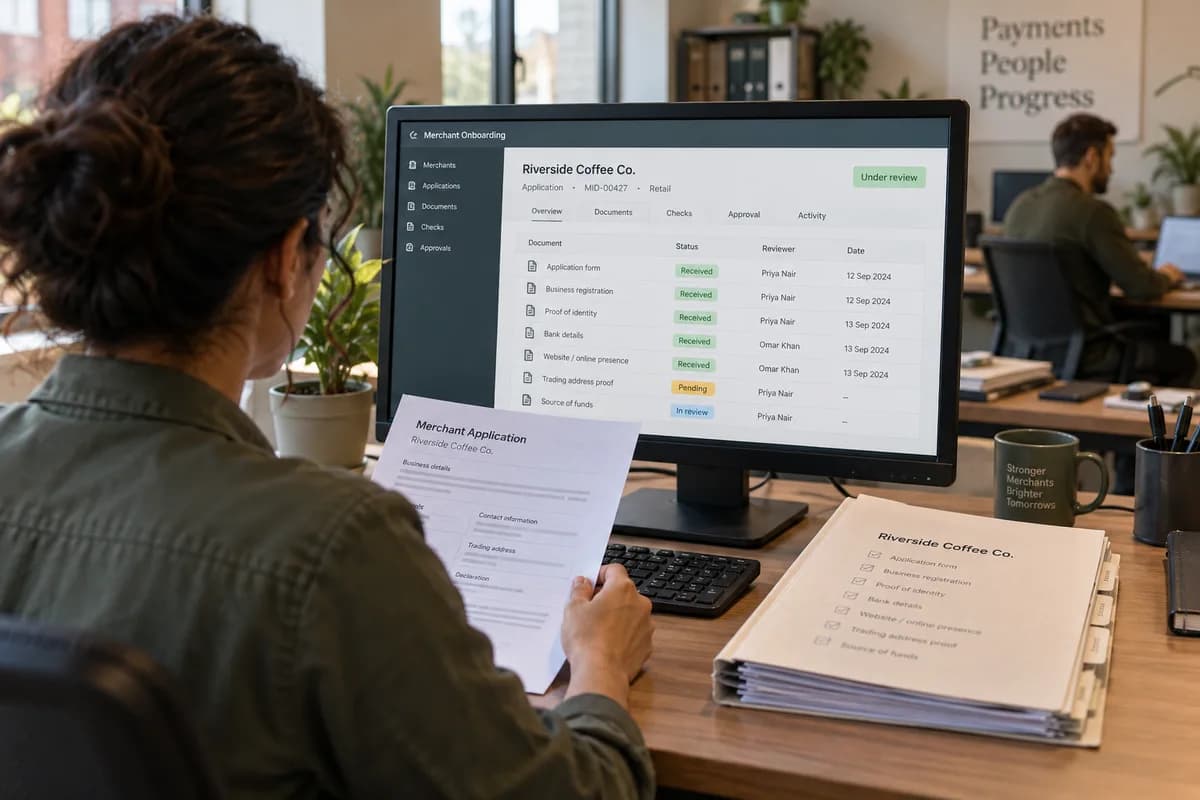
Merchant onboarding, rate cards, payout batches, reserves, reconciliation and chargebacks all sit inside Payment Service Provider Management Software, which GullySystem configures around how each provider works. Each merchant file holds its papers, pricing, payouts and disputes. The gateway stays where it is. Finance, risk and support read one record of what is owed and why.
What goes wrong before the software.
How the work flows through it, step by step.
- 1
Application
A merchant applies through a form or a sales contact. The business type, expected volume, payment modes and website are captured, and an analyst is assigned.
- 2
KYC and screening
Papers are collected against a checklist. Ownership is mapped, names are screened, a category code and risk tier are set, and approval is recorded with its reasons.
- 3
Pricing and go-live
The signed agreement and rate card are attached with effective dates. Settlement account details are verified before the merchant is switched on in your gateway.
- 4
Capture and payout
Capture and fee files are imported each cycle. A batch is built net of fees, refunds and reserves, reviewed by an approver and passed to the bank process.
- 5
Reconciliation
Batches are matched with the sponsor bank statement and partner files. Breaks get a cause and an owner, and clear before the cycle is closed.
- 6
Disputes and support
Chargebacks, refunds and merchant queries are worked from one desk. Evidence is attached, deadlines watched, and outcomes posted to the next payout advice.
What is inside.
Every module can be switched on, left out or changed to match how your team already works.
The business modules it is built from.
Each one is also available on its own, or inside a system built for you.
- Document Management
Ownership papers, identity documents and bank proof are filed per merchant against a checklist that shows what is missing and who chases it.
- Contract Management
The signed merchant agreement sits beside its pricing, and each change in discount rate carries an effective date and an approver.
- Workflow and Approvals
A payout batch moves from preparation to a named approver by value, and no batch is released without that recorded yes.
- Bank Reconciliation
Capture files, payout batches and sponsor statement lines are matched, and every unmatched entry is listed with a cause and an owner.
- Ticket Management
A merchant query becomes a numbered case linked to the payout or dispute it concerns, routed to finance or risk.
- Client Portal
Merchants sign in to read payout advices, refund status, reserve balances and monthly statements without ringing support.
- Audit Trail
Edits to rates, holds, approvals and batches are logged with user and time, so a payout can be traced to the decision behind it.
- Multi-Currency Support
Merchants settled in different currencies show their net amount in the settlement currency, with the rate and fee tax noted on the advice.
How we would put it in.
Setup, data migration, integrations and anything built on top.
Every part of the system, by area.
Take the modules you need. Each one works on its own or inside a larger system built for you.
- Applicant Tracking (5)
- CRM (8)
- Finance & Accounting (10)
- Helpdesk (4)
- Human Resources (13)
- Inventory Management (5)
- Project Management (7)
- Manufacturing (6)
- Procurement (4)
- Sales and Distribution (6)
- Field Service (5)
- Statutory and Compliance (4)
- Retail and POS (4)
- Bookings and Appointments (3)
- Subscriptions (2)
- Assets and Fleet (4)
- Platform (6)
- Analytics (2)
- Documents (1)
- All business solutions
One system, each person sees their part.
For onboarding analysts
Work the application queue, chase missing papers, record screening results and send each file to risk with the reasons attached.
For risk and compliance staff
Review tiers, approve or decline merchants, set reserves and read the audit log of every pricing and hold change.
For settlement accountants
Import captures, build and approve payout batches, reconcile against bank statements and clear breaks by cause.
For merchant support
Answer payout, refund and reserve queries from the merchant file, and route disputes and corrections to the right desk.
For merchants
Sign in to read payout advices, refund status, reserve balances and monthly statements.
The numbers the owner asks for.
- Applications by stage, reviewer and missing document
- Merchants by risk tier, category code and payment mode
- Payout batches by cycle, with fees, refunds and reserves deducted
- Reconciliation breaks by cause, age and owner
- Reserves held and due for release by merchant
- Chargebacks by reason code, response date and outcome
- Refund and adjustment volume by merchant and approver
Who this is built for.
- Payment aggregators that onboard small and medium merchants
- Payment gateways that pay out to merchant bank accounts
- Acquiring partners with an in-house merchant operations team
- Payment facilitators that serve marketplaces and platforms
- Fintech firms that run payouts and disputes for sub-merchants
When it is not the right choice.
- A business that only accepts card payments through a hosted checkout has no merchant base to manage and needs only its own accounts.
- Banks that run deposits and loans will find Bank Management Software closer.
Adapted to your business before it goes live.
You are not handed a login and left to it. The product is set up around your records, your people and the tools you already use.
Works alongside
- Payment gateway files and APIs
- Acquirer and sponsor bank statements
- Sanctions screening service
- SMS
- Accounting export
Questions owners ask before a demo.
Does this replace our payment gateway?
No. Authorisation and routing stay in your engine. This system holds the merchant, pricing, payout, reserve and dispute records around it.
Can it move money to merchants?
No. It prepares and approves the payout batch and its figures. The bank instruction follows your existing banking process under your own licence.
Which statement formats can it read?
Common layouts such as MT940, camt.053 and CSV are read, plus the capture files your partners send. A live bank feed depends on what the bank offers.
How are discounted rates applied by date?
Each rate card carries an effective date. A payout uses the card in force on the capture day, so a mid-month change does not rewrite earlier batches.
Does it screen merchants against sanctions lists?
It records the result of the screening you run and can connect to a screening service. Lists, thresholds and decisions belong to your risk team.
Can it help with PCI or licence audits?
It keeps merchant papers, approvals and change logs in order. Meeting any standard is for your assessor and compliance adviser to judge.
How are chargeback deadlines handled?
Each dispute is logged with its reason code and response date. The queue sorts by the nearest expiry, and evidence sits on the same record.
Can merchants see their own balances?
Yes. A merchant login shows payout advices, refunds, reserves and statements. Support opens the same screens, so the answer matches.
How do we judge fit, and what shapes the cost?
Start with a demo built on sample merchants and a sample batch. Cost then follows the partner file layouts to be read, the screening service and bank statements connected, approval steps, merchant logins, and the migration of existing merchant files. A written proposal prices each part.
How do we get our records out later?
Merchant files, batches and dispute histories can be exported in formats agreed in the proposal. That route is fixed before work starts.
When could settlement accountants build a payout batch here?
The merchant application and KYC file, contracts with rate cards, and capture file import feeding settlement batches would be the likely first block. Reserves, reconciliation, dispute queues and merchant logins follow. The proposal names the order and dates for each stage.
What should onboarding and settlement teams gather first?
Gather the signed merchant agreements with their rate cards, your onboarding checklist and risk tier policy, sample capture, refund and fee files from each partner, and bank statements. A KYC file and a payout advice work as samples. Onboarding, risk, settlement and support each name a contact.
Wondering what it would cost? Share your requirements and an engineer will come back with a scope.
Built for.
The trades this product is set up for. Pick yours to see how the work runs there.
Related products.
See Payment Service Provider Management Software set up around your records.
Tell us how you run things today. An engineer reads it and writes back with what fits as it is, what would need changing, and what we would start with.
What happens after you share your requirements
- A senior engineer reads your answers. Nobody phones first.
- Within one business day you get a written note: what we understood, what we would start with, and the questions we still have.
- If it fits, a proposal follows with the order of work, what we need from you and what you receive at each step.
- No call is booked and nothing is paid until you have read the note. Your details stay with us.
Start with your requirements
Seven short steps that tell us what you need. A senior engineer reads them before anyone gets in touch.
Share your requirements