One account for each subscriber, from sign-up and installation to billing and faults.
Manage subscriber accounts, plans, coverage checks, installation jobs, routers and optical units, fault tickets, outage notices and recurring bills in one system. Each subscriber carries a plan, a connection point, a device serial and a ticket history. Crews open the day’s installs and repairs on a phone and finish each job at the address.
- Plans, tariffs and add-ons set out as you sell them
- Subscribers, device serials and open invoices brought across
- Plan and tariff changes made by GullySystem staff on request
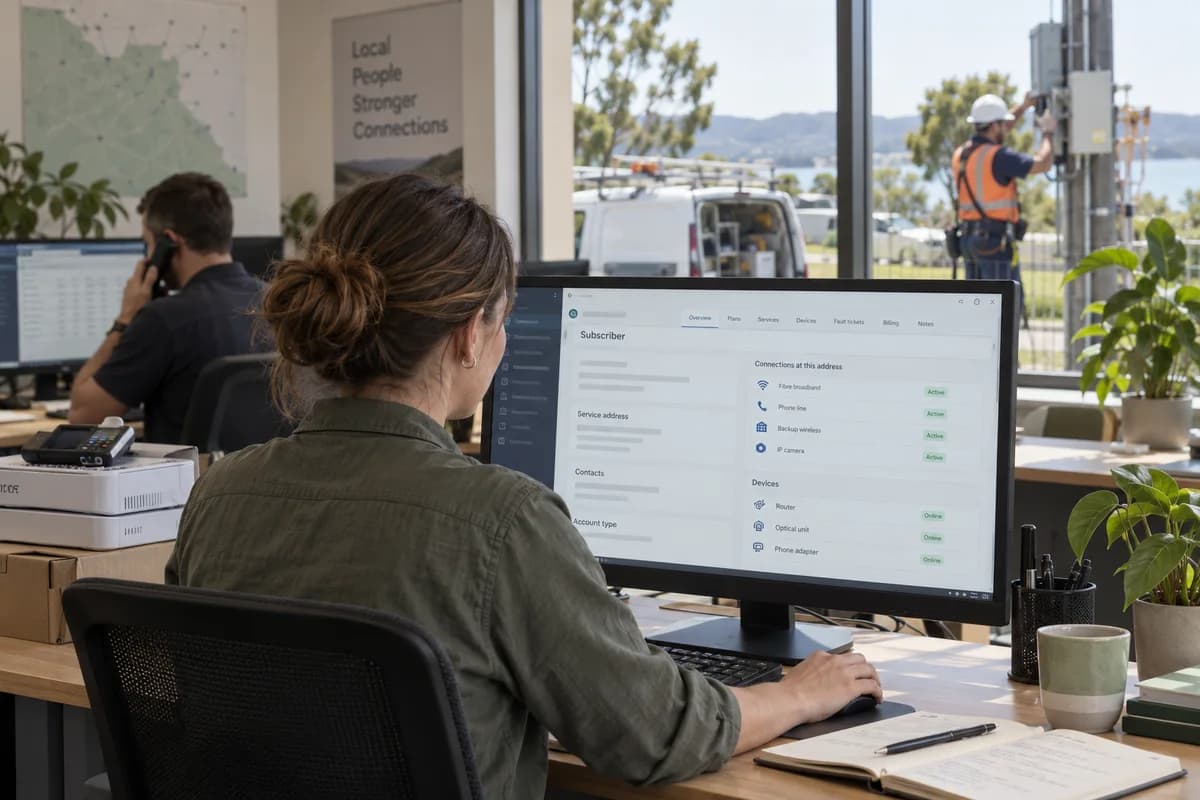
Regional broadband, fibre, fixed wireless and voice providers keep subscribers, plans, installs, device stock, faults and billing in Telecom Service Provider Management Software, configured by GullySystem for their network. Every account holds its plan, port, device serial and ticket history. Field crews close jobs from a phone. One outage notice reaches every affected subscriber.
What goes wrong before the software.
How the work flows through it, step by step.
- 1
Enquiry and coverage check
A sign-up arrives from a shop, a partner or the website. The address is matched to the cabinet, splitter or mast that would serve it.
- 2
Plan and agreement
The subscriber picks a plan with any add-ons. Business accounts are given a service agreement with its term and restore target.
- 3
Installation
A crew is scheduled, fits the drop and device, and records the port and serial. The job closes when the line is confirmed live.
- 4
Activation and first bill
The account goes live on a start date. The first invoice carries the installation fee and a part-cycle charge for the plan.
- 5
Support and faults
Faults are logged against the account and grouped under a network incident when many share the cause. Technicians close each visit with notes.
- 6
Renewal or disconnection
Contract end dates and plan changes are tracked, and a disconnection records the device returned and the final balance.
What is inside.
Every module can be switched on, left out or changed to match how your team already works.
The business modules it is built from.
Each one is also available on its own, or inside a system built for you.
- Contact & Account Management
A subscriber and each connection at each address are held as separate records, so a business with five sites shows five lines under one account.
- Price Lists and Schemes
Speed tiers, bundles and fees sit in one price list, with the rule for a plan changed in the middle of a cycle.
- Technician Scheduling
Crews are scheduled by area against the day’s installations and repairs, and each job closes only once the port and device serial are on record.
- Batch and Serial Tracking
Each router, optical unit and SIM card is followed by serial from the warehouse to the subscriber and, on disconnection, back again.
- Ticket Management
Every fault becomes a numbered ticket on the account, and tickets sharing a failed cable or mast are linked under one incident.
- WhatsApp, SMS and Email Notifications
One restore message goes out over SMS, email or other messaging to each subscriber on an incident, then changes as the repair progresses.
- Subscription Billing
An invoice is raised each cycle from the plan, add-ons and credits, and payments are matched against it as they arrive.
- Contract Management
Restore targets, address blocks and renewal dates from each business agreement are kept on the account, so support can read them during a fault call.
How we would put it in.
Setup, data migration, integrations and anything built on top.
One system, each person sees their part.
For owners
See subscribers by plan, installations pending, open incidents, overdue balances and device stock against what is issued.
For sales and agents
Check coverage for an address, take a sign-up, quote a plan and follow the installation until the line is live.
For support desk staff
Open an account, see the plan, device and past tickets, log a fault and tell the subscriber the status of an incident.
For field technicians
See the day’s installations and repairs on a phone, record port, serial and readings, and close each job on site.
For billing and collections staff
Run each cycle, post payments, issue credits and call accounts with overdue balances.
The numbers the owner asks for.
- Subscribers by plan, area and account type
- Installations booked, completed and waiting for a device
- Fault tickets by cause, area and age
- Network incidents with accounts affected and restore time
- Devices issued, returned and unaccounted for, by serial
- Invoices raised, paid and overdue by cycle
- Business contracts due for renewal
Who this is built for.
- Local broadband and fibre providers with their own installation crews
- Fixed wireless providers serving towns and rural areas from masts
- Voice and VoIP service providers selling lines to small businesses
- Cable and community network operators billing homes by plan
- Telecom resellers who sign up subscribers on a carrier’s network
When it is not the right choice.
- A national mobile carrier with its own billing and network platforms will not replace them with this.
- A shop that only sells mobile handsets and SIM cards will find Electronics Retail Management Software closer.
Adapted to your business before it goes live.
You are not handed a login and left to it. The product is set up around your records, your people and the tools you already use.
Works alongside
- SMS
- WhatsApp and other messaging
- Payment gateway and bank debit
- Radius and provisioning tools
- Accounting export
- Telephony and call logs
Questions owners ask before a demo.
Does it replace our network management tools?
No. It holds subscribers, plans, devices, tickets and bills. Your network tools keep provisioning and monitoring. If you want a bridge from them to subscriber records, we agree its shape with you at the start.
Can a subscriber change plan in the middle of a cycle?
Yes. Plan changes carry a start date, and the next invoice is adjusted by the rule you set for upgrades and downgrades. You settle that rule with us before the first plan change is billed.
How are routers and optical units tracked?
Each is received by serial, issued to an account at installation and marked returned on disconnection. The report of devices out shows who still holds one.
Can one outage message go to every affected subscriber?
Yes. Tickets are linked to a network incident, and a single message goes by SMS, email or other messaging to every account on it.
Can business accounts have restore targets?
Yes. The service agreement holds the target and term. Support sees them on the account when that business reports a fault.
Does it handle usage-based charges?
It can bill from a usage file supplied by your network. The file layout and the rating rule are agreed with you before work begins.
Can agents and resellers use it?
Yes. Each agent has a login limited to their own sign-ups and collections, and commission follows the rule you set.
Do field crews need a signal to close a job?
Crews use a phone browser, so a signal is needed when a job is closed. Dead zones are common on rural routes, so notes can be entered once the crew is back in coverage.
How do we find out the cost?
After a short conversation about your subscriber count and modules, you see a demo of the working system. A written proposal then gives the figure.
Can we take our subscriber data out?
Yes. Subscriber accounts, plans, device serials and billing history export to ordinary spreadsheet and data files, with the layout stated in your proposal.
Wondering what it would cost? Share your requirements and an engineer will come back with a scope.
Businesses that use this.
See Telecom Service Provider Management Software with your own data.
Tell us how you run things today. We’ll show you the parts that matter to you and say plainly what would need changing.
- No obligation
- A reply within one business day
- Your details stay private
Start with your requirements
Seven short steps that tell us what you need. An engineer reads them before getting in touch.
Share your requirements