Request intake and booking for handyman firms
Every repair request, whether it arrives by phone, web form, text or email, is logged with its source, address and photographs of the fault. Staff then book a diary slot with the right handyman. A leaking tap never shares a gap with a shelf that needs hanging.
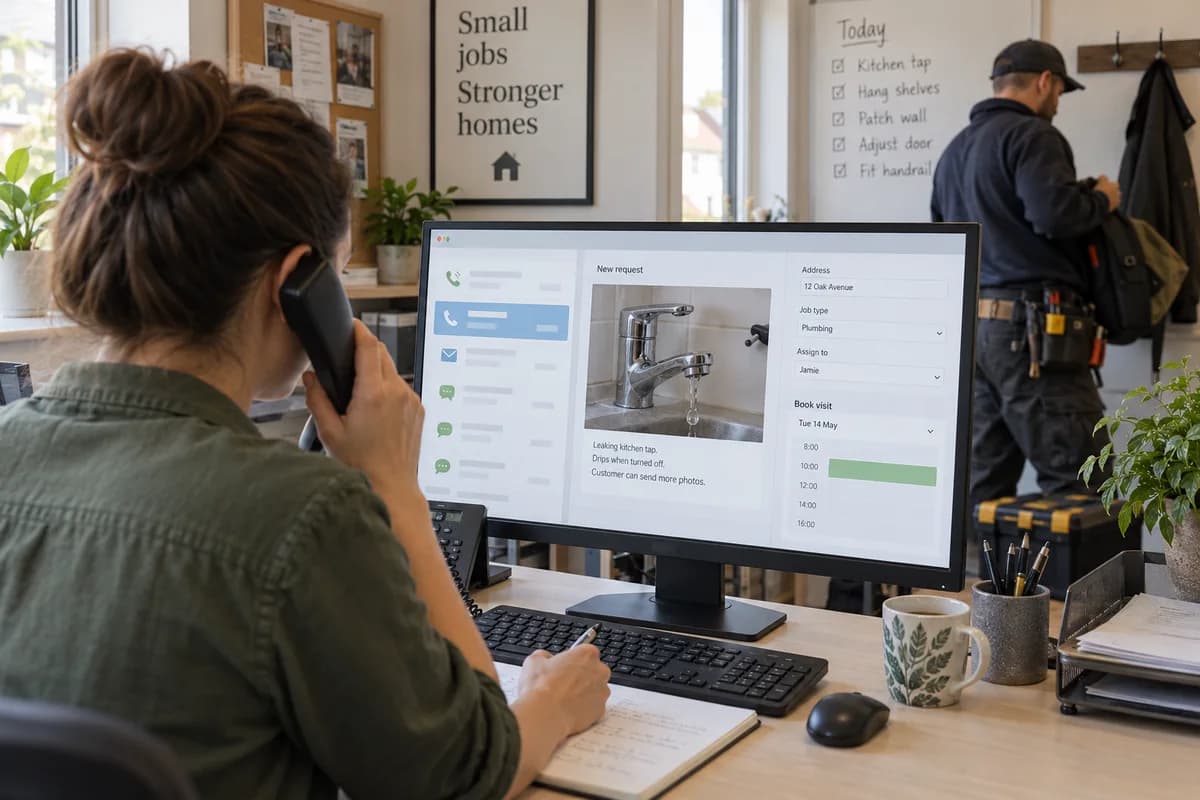
What a handyman request record keeps
Each job starts as a request record. It holds the channel the customer used, the address, the kind of work and any photographs sent. Quotes, visits and invoices attach to it later. Whichever channel brings the request, the same fields get filled.
From first call to booked slot
Intake is busiest first thing, when tenants ring about overnight leaks, and again in the evening, when forms and messages pile up. Both queues are worked the same way. Each request is entered once, matched to a customer, then booked.
What owners, office staff and handymen see
The request screen shows each person the part of the record that matters to them. Staff edit it, handymen read it on a handset, and the owner watches the queue. Landlords see only their own properties.
Decisions to settle before intake goes live
A few choices keep the queue clean. They are easy to settle during set-up and awkward to change once habits form. Agree them with the office lead and a senior handyman.
How intake hands over to the rest
A request is rarely finished at booking. It passes to pricing, scheduling and messaging, and it returns when a snag turns up later. Keeping it as the root of the job means every later record traces back to the first call. Photographs, address and channel travel with it.
- Customer and property records supply the address and key safe notes
- Task list and quotations take the request when a price is needed
- Daily schedule and dispatch receives the booked slot and fault photographs
- Customer messages send the booking confirmation from the same record
- Follow-ups and return visits link back to the original request
Where request intake stops
Intake logs and books. It does not price a job, judge whether a handyman is qualified for it, or plan the route. Those belong to the task list, the skills recorded for each handyman and the schedule. Whether to refuse a distant job stays with the owner. A sole handyman with a few repeat customers can manage on a calendar and a notebook.
Frequently asked questions
What happens when one tenant sends the same fault twice?
Staff attach the second message to the open request instead of creating a new one. Photographs from both stay together. Two handymen are not sent to the same tap. The history shows when each message arrived and by which channel.
Can a request be logged before the address is confirmed?
Yes, with the details known so far. It is saved as waiting, and nothing is booked until the address is confirmed. Nobody drives to a flat that was wrongly noted. Waiting requests stay visible in the queue, so none slips away.
How do we avoid booking two jobs into one gap?
A slot given to a handyman shows as taken for everyone in the office. A second request cannot go there unless the first moves. Moving a booking frees the gap again. Two people booking at once see the same diary.
Can photographs be added after the booking is made?
Pictures may arrive late. A tenant might text them the evening after the call, and staff file them on the booked request. The handyman sees them on the handset before the visit starts. The booking itself stays untouched.
Does intake work for letting agents with long lists?
Each repair on an agent’s snag list is logged as its own request against the right flat. The agent is the customer on each. Staff book them one by one, or together when a single visit can clear several.
How this feature fits the system.
Handyman Management Software: the parts that work with this feature, the trades that use it and the ways to put it in place.
Request intake and booking
Each request is logged with its channel, address and photographs, so nothing is lost between calls, forms and messages.
Lead ManagementTask list and quotations
Quotes are built from fixed-price tasks and hourly rates, sent to the customer for acceptance, and every revision stays on file.
Estimate/Quotation ManagementDaily schedule and dispatch
Stops are matched to each handyman by skill and area, and the day’s list opens on his phone with access notes.
Technician SchedulingTell us what you need.
Tell us what your team does today, where work gets stuck and what you want to change.
What happens after you share your requirements
- We review your brief and the systems you already use.
- We clarify the workflow, missing information and the work to consider first.
- The proposed scope sets out the deliverables, responsibilities and dependencies.
- Review the scope and commercial terms before deciding whether to proceed.
Start with your requirements
Describe your current process, the people involved and the change you need. Start with the details you know; we can clarify the rest together.
Share your requirements