Wearer lists, size runs, signed samples, stitching lines and packing by wearer.
Wearer lists are turned into size runs for the cutting room, and each signed sample is kept with its trims and measurements. Bundles are followed through the stitching line, logos and name work are attached to the wearer, and sets are packed by name and carton. A repeat order starts from the earlier garment, so a school or hospital gets the same uniform each time.
- Shirts, tunics, trousers and their size charts keyed in as your buyers specify
- Earlier buyers and signed samples carried across from your folders
- Later edits to size charts and operation lists done by our team
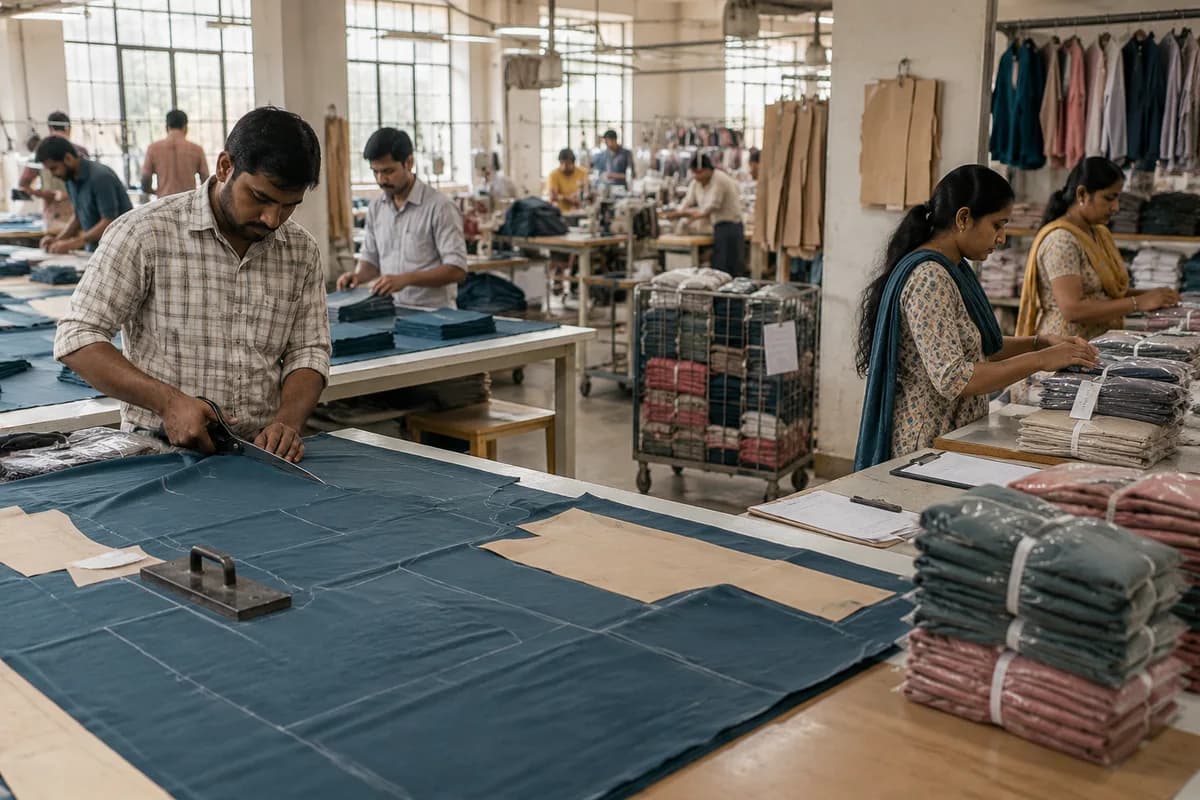
Uniform Manufacturer Management Software is set up by GullySystem for factories making school, corporate, hospital, hotel and security uniforms. It holds the buyer’s wearer list, the signed sample, the cutting plan and the stitching progress. Packing is done by wearer and carton, and a repeat order begins from the garment that was approved before.
What goes wrong before the software.
How the work flows through it, step by step.
- 1
Enquiry and sample
The buyer’s garment, fabric and colour are quoted. A sample is made, corrected and signed, and the signed version is filed.
- 2
Wearer list
The list of wearers and sizes is loaded, checked against the size chart and converted into a size ratio for cutting.
- 3
Fabric and cutting
Rolls are received, shade checked and laid by ratio. Cut pieces are bundled and tagged with their roll.
- 4
Stitching and checking
Bundles go through operations on the line. Checkers pass, return or reject, and rework goes back to the operator.
- 5
Logo and finishing
Embroidery, badges and name tapes are added, garments pressed, measured against the sample and tagged.
- 6
Packing and delivery
Sets are bagged by wearer, cartons listed by class or department, and the delivery note matches the order.
What is inside.
Every module can be switched on, left out or changed to match how your team already works.
The business modules it is built from.
Each one is also available on its own, or inside a system built for you.
- Order Management
Reordering opens the earlier order with its sample and size chart, so only the new wearers and quantities are keyed.
- Bill of Materials
The signed sample carries its fabric, trims, thread and measurements as one list that every bulk lot is made from.
- Goods Receipt (GRN)
Rolls and trims are checked against the delivery note on arrival, with shade and shrinkage noted before cutting may begin.
- Production Planning
The cutting master lays each order by size ratio and the plan shows pieces cut, bundled and waiting for the lines.
- Quality Control
Checkers pass, return or reject pieces by operation, and the rework count is shown to the line supervisor the same day.
- Job Work Management
Panels sent for outside embroidery go out on a delivery note, and pieces returned and rejected are compared with those sent.
- Batch and Serial Tracking
Each bundle tag links the stitched piece to its fabric roll and lay, which helps when a shade complaint arrives.
- Document Management
Photographs, measurement sheets and the buyer’s signed approval are filed against the sample so they are found at the repeat.
How we would put it in.
Setup, data migration, integrations and anything built on top.
One system, each person sees their part.
Factory owner
See orders by buyer, pieces cut and packed, rework by line and the repeat orders due next term.
Merchandiser
Take the wearer list, keep the signed sample, answer the buyer’s change requests and release the order to cutting.
Cutting master
Receive the size ratio, plan lays against fabric on hand and tag the bundles for the lines.
Line supervisors and checkers
Record pieces passed, returned and rejected by operation, and see which bundle is waiting where.
Packing team
Bag each set under its name, build the carton list and print the delivery note.
The numbers the owner asks for.
- Pieces cut, stitched and packed by order
- Rework and rejection by operation
- Fabric used against fabric planned
- Orders pending by buyer and delivery date
- Repeat orders due by term or intake
- Embroidery pieces sent and returned
- Cartons packed against the wearer list
Who this is built for.
- School uniform makers selling to schools and dealers
- Corporate and office uniform factories
- Hospital, hotel and security uniform suppliers
- Workwear makers with repeat institutional buyers
- Makers who send embroidery or printing to an outside unit
When it is not the right choice.
- A tailor stitching a few sets to measure can work from a measurement book.
- A fashion label producing seasonal collections is better served by the manufacturing production product.
Adapted to your business before it goes live.
You are not handed a login and left to it. The product is set up around your records, your people and the tools you already use.
Works alongside
- Accounting export
- Embroidery unit delivery notes
- Barcode or label printer
- WhatsApp or SMS for order updates
Questions owners ask before a demo.
Is this for tailoring shops or factories?
For factories and larger workshops that cut and stitch in lots from a buyer’s wearer list. A tailor taking single measurements needs only a small order book.
How does a wearer list become a cutting plan?
The list is loaded, each size is checked against the chart, and the count per size becomes a ratio for the lay. The cutting master can adjust it before release.
Can it keep the approved sample for a school?
Yes. Measurements, trims, photographs and the signed approval are held together. That version is picked up again unless a new sample is approved.
What if the buyer revises sizes mid-order?
A new version of the list is saved. The system shows what changed against the pieces already cut, and the merchandiser decides what is made again.
How are logos and names tracked?
Embroidery, badge and name tape work is linked to the garment and the wearer. Garments that go to a contract unit are listed on a send-out slip and counted back in when they return.
Can cartons be packed by class or department?
Yes. The carton list follows the buyer’s class or department split, each set carries a name and size, and the delivery note prints from the same list.
Will our running orders carry over?
Yes. Running orders, buyer contacts and recent samples are keyed across from your folders, then the merchandiser compares them with the cutting room before the first lay is released.
Who can see what?
Permissions decide it. Cutting masters see lays, checkers see their bundles, and rates or buyer prices can be hidden from the floor.
How is it priced?
No figure is listed here. The quote is drawn up after you have seen the system with one of your own garments. It reflects your lines, users and buyers.
Is it needed for a small unit?
Not always. A unit with a handful of regular buyers can manage on sheets. The need shows when repeat orders, many sizes and embroidery work start to collide.
Wondering what it would cost? Share your requirements and an engineer will come back with a scope.
Businesses that use this.
See Uniform Manufacturer Management Software with your own data.
Tell us how you run things today. We’ll show you the parts that matter to you and say plainly what would need changing.
- No obligation
- A reply within one business day
- Your details stay private
Start with your requirements
Seven short steps that tell us what you need. An engineer reads them before getting in touch.
Share your requirements