One system for counter billing, customer credit, stock and deliveries.
Bill at the counter with barcodes and tax invoices for neighbourhood stores, supermarkets and small chains. Stock reduces with every sale. Customer credit is kept on each customer’s account, and phone and WhatsApp orders go on one list and out with a rider who updates delivery from a phone. You can start with billing alone and add the rest when you need it.
- Item list, barcodes, units and prices loaded before the first bill
- Start with counter billing, with delivery and the customer app to follow
- Supported remotely by phone, video session and WhatsApp
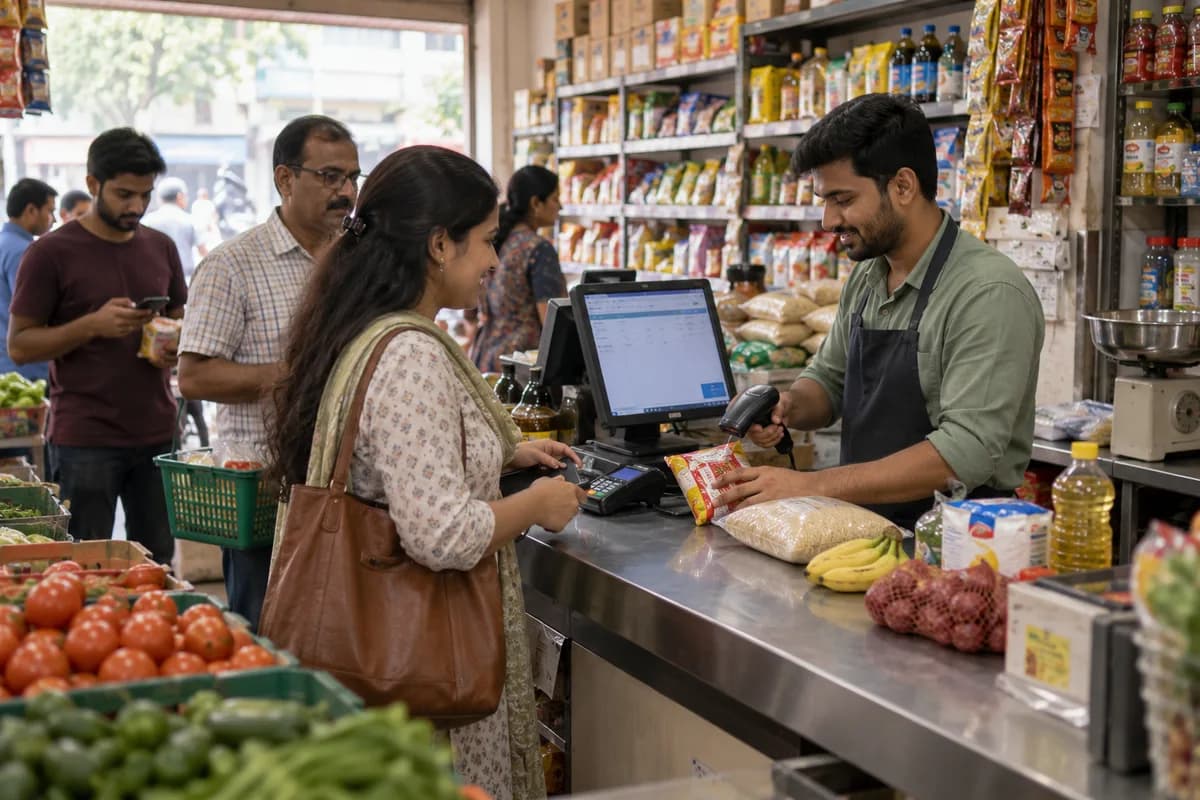
Grocery Management System is billing and stock software GullySystem sets up for neighbourhood stores, supermarkets and small chains. The counter bills by barcode with tax invoices, regulars’ credit sits on a customer account, and phone and WhatsApp orders go out with a rider. Stock falls with every sale. Many shops begin with billing alone and add the rest later.
What goes wrong before the software.
How the work flows through it, step by step.
- 1
Orders arrive
Counter customers, phone calls and WhatsApp lists all land on the same order list. Each order carries its source, so the packer knows whether a rider or the customer will collect it. Nothing waits in a chat.
- 2
Counter billing
Scan items by barcode or pick from the list and print a tax bill. Weighed items come in by price lookup. Payment is recorded by cash, bank transfer, card, mobile wallet or credit on the customer’s account.
- 3
Stock updates
Each sale reduces stock. Items running low raise an alert on the dashboard before the shelf is empty, with the supplier and the last purchase rate shown beside the item, ready for the next order.
- 4
Packing and dispatch
A delivery order is assigned to a rider after packing. The rider sees the address, the crate or bag count and the items on a phone, and updates status on the way. Late orders show on the owner’s screen.
- 5
Delivery and settlement
The rider marks the order delivered and paid, and you see this straight away. A cash collection or a wallet payment is tied to the bill, so settlement at night needs no phone calls to riders about who paid what.
- 6
Close of day
Sales, purchases and the day’s shop expenses sit together. Credit dues by customer and the profit for the day are shown on one screen, with wastage listed so the owner sees what was written off.
What is inside.
Every module can be switched on, left out or changed to match how your team already works.
Counter billing with barcode and tax invoice
Bill quickly with barcode scanning and tax invoices, accepting cash, transfer, card, wallet or credit. Weighing scale items, loose rice or vegetables and packed goods all print on the same bill.
Learn moreCustomer credit accounts
Track credit given and payments received per customer. See the total each customer owes today, with the last payment date, so a message goes to the right household before the month-end rush. Overdue accounts are listed oldest first.
Learn moreStock and low-stock alerts
Update stock with every sale and purchase, with alerts for items running low and a view of what sells and what does not, so shelf space follows what leaves the store. Short-dated dairy, bakery and frozen items are listed first, with a markdown price suggested.
Learn moreSupplier purchases
Record purchases against each supplier and distributor. Stock rises on receipt, and the cost reaches your profit, so a rise in the wholesale rate of oil or flour shows in margins at once.
Learn morePhone and WhatsApp orders
Enter orders taken on calls and WhatsApp on the same list as counter and app orders. Then pack, bill and send them, with a substitution noted whenever an item is out of stock. Packers never guess.
Learn moreDelivery rider app
Give riders orders on an Android phone. They update status on the way and confirm delivery and payment at the door, and the apartment block, floor and phone number sit on the order.
Learn moreCustomer ordering app
Offer your own app and web page where regulars see prices and place an order. A past order can be repeated in one tap, with no marketplace commission to pay.
Learn moreExpenses and profit
Record rent, salaries, electricity and other shop expenses daily. Profit is then worked out from real numbers, so cold storage power and carry bag costs show up in the margin of every item.
Learn moreOrder and bill messages
Send order confirmations, delivery updates and bills to customers by SMS or WhatsApp. Templates carry the shop’s name and are approved by the owner before they go out.
Learn moreStaff logins and permissions
Give owners, counter staff and riders their own screens. Counter staff cannot edit prices or see profit unless you allow it, and every discount or void bill is logged against a name, so an odd void bill can be questioned.
Learn moreSales and profit reports
Review daily, weekly and monthly sales, stock movement, expenses and delivery performance, exportable for your accountant. Wastage and markdowns are listed by item, so shrinkage is visible.
Learn moreThe business modules it is built from.
Each one is also available on its own, or inside a system built for you.
- Point of Sale Billing
Counter staff scan barcodes and issue tax invoices, taking cash, transfer, card, wallet or credit on the same bill.
- Barcodes and Labels
Each item carries a barcode that the billing counter scans, which keeps bills quick and removes any need to remember rates.
- Stock Tracking and Alerts
Every sale and purchase updates stock, with alerts for items running low and a view of what sells and what does not.
- Purchase Order Management
Purchases are recorded against each supplier and distributor, so stock rises on receipt and the cost reaches the profit figure.
- Order Management
Orders taken on calls and WhatsApp join the same list as counter and app orders, then get packed, billed and sent.
- Expense Tracking
Rent, salaries, electricity and other shop expenses are entered daily, so the owner reads profit from real numbers.
- Roles and Permissions
Owners, counter staff and riders each get their own screens, and counter staff cannot edit prices or see profit unless allowed.
- Credit Limits and Control
Each customer’s account records credit given and payments received, showing the total that customer owes today.
How we would put it in.
Setup, data migration, integrations and anything built on top.
Topics beyond the modules.
Each page covers one part of how the system is used, connected or controlled.
Grocery Store Software Demo Walkthrough
The demo shows counter billing with a scanner, stock falling with each sale, and phone and WhatsApp orders entered on one list. It runs on a few of your own items, not a sample shop.
Learn moreGrocery Store Software Questions and Answers
These answers cover what the grocery store software does, tax billing, customer credit, WhatsApp orders, delivery, data ownership and how a start is scoped for a shop with one counter or three.
Learn moreGrocery Store Software Pricing and Scoping
No price is published for the grocery store software. It depends on the counters, the stores and the parts you switch on.
Learn moreSupport for Grocery Store Software
Support covers printer and scanner faults, stock that looks wrong, disputed credit balances and rider logins. Help comes by phone, video session or WhatsApp, and a failed counter PC does not stop billing, because a spare counter machine takes over.
Learn moreGrocery Store Software Use Cases by Shop Type
Each shop type uses a different part of the software. A corner store leans on customer credit, a supermarket on barcodes and a delivery shop on riders. Each part is switched on separately.
Learn moreIntegrations for Grocery Store Software
The grocery system connects to accounting software, WhatsApp, SMS, mobile wallets and payment gateways, barcode scanners, weighing scales and bill printers, so the till and the scale feed one record.
Learn moreReports and Dashboards for Grocery Store Owners
The grocery system reports sales, item movement, credit dues, purchases, expenses, profit and rider deliveries, and the owner reads them on a phone at closing.
Learn moreOne system, each person sees their part.
For owners
See sales, stock, credit dues, expenses and profit from a phone or laptop, including when away from the store, and compare weekday and weekend counters at a glance. Items that never move appear on their own list.
For counter staff
Bill quickly by barcode, give credit on a customer account and add phone or WhatsApp orders to the list, then count the till at closing against the bills printed that day. Void a bill only with the owner’s approval.
For delivery riders
See assigned orders on an Android phone with address and items. Mark orders delivered and paid, and the owner sees cash in hand per rider before the shift ends. Nobody phones for a total.
For regular customers
Use your store’s own app to browse prices, place an order and repeat a previous list. Check the order status without calling the counter.
The numbers the owner asks for.
- Sales by day, week and month, with the busiest hours at each counter
- Fast-moving and slow-moving items, with stock cover in days and the last purchase rate
- Credit outstanding by customer, with the date of the last payment and the age of each balance, so reminders go first to the oldest households
- Purchases by supplier
- Expenses and profit for the month
- Deliveries by rider, with payment status, cash in hand and the orders still out on the road at closing time
- Sales export for tax returns
Who this is built for.
- Corner stores with a busy evening counter and regulars on credit
- Supermarkets that bill packed goods by barcode
- Stores with one or more delivery riders for nearby apartments
- Shops taking a large share of orders on WhatsApp
- Small chains of two or three stores that want one stock and sales view
When it is not the right choice.
- If you run a large chain with a central warehouse and head-office buying, you need a retail ERP built for that scale, with warehouse transfers, vendor contracts and store-wise stock approvals.
- It will not list your store on quick-commerce apps. The customer app is your own shop’s, for your own customers.
Adapted to your business before it goes live.
You are not handed a login and left to it. The product is set up around your records, your people and the tools you already use.
Works alongside
- Accounting package export
- SMS
- Mobile wallets and payment gateways
- Barcode scanners and bill printers
Questions owners ask before a demo.
Is it corner-shop billing software or a full grocery system?
Both. You can start with counter billing alone, with barcodes, tax bills and customer credit. Stock, delivery and the customer app are switched on when you want them, shelf by shelf if you prefer. Nobody pays for a rider app they do not yet use.
Can it keep my customers’ credit accounts?
Yes. Credit sales go to the customer’s account and payments are recorded against it. You see who owes what without opening the book, and each household’s balance carries the date of its last payment.
Can I take orders on WhatsApp and deliver them?
Yes. WhatsApp and phone orders go on the same list as counter orders. They are packed and billed, and assigned to a rider who updates delivery from a phone, with the doorstep payment recorded against the bill before the rider returns to the store.
Does it print tax bills and help with filing?
It prints tax bills at the counter, with rates set for your country and checked with your adviser, for packed goods and loose items alike. Your accountant can export sales and purchase reports to file returns. Filing itself is not done for you.
How does it reach our accounts?
Through an export. Reports download in a form your accountant can load into your accounting software. Connecting the two live would be extra work, quoted once the format is known.
Can our item list and barcodes be loaded?
Yes. Items, prices and barcodes come in from your current billing software or Excel, along with credit balances. Duplicate items are flagged. You check them before the first bill, starting with the fastest sellers on the shelf.
Does it work on a mobile phone?
Yes. The rider app runs on ordinary Android phones, and you can check sales and stock from yours, wherever you are, without opening a laptop. The counter works best on a computer with a scanner and printer, plus a scale if you sell loose items.
Who owns the sales and customer data?
You do. It is backed up regularly, and reports export on request. The proposal covers how everything is returned to you, including items, customers, credit balances and bills.
What does it cost?
No price is published. It depends on counters, stores and which parts you switch on. You see it billing before anything is quoted in writing, using a few of your own items and a sample credit account.
Would a small corner shop with one counter find it excessive?
It may be. If you only need a plain tax bill, a basic billing app is enough. Send us your daily bill count and delivery routes, and we will tell you whether a simpler app does the job.
Wondering what it would cost? Share your requirements and an engineer will come back with a scope.
Written for this trade.
Practical notes on running the business, not product marketing.
Businesses that use this.
Related products.
Selling these goods online as well?
These e-commerce pages describe the online side: the storefront, dealer ordering and the connections to a system like this one.
See Grocery Management System with your own data.
Tell us how you run things today. We’ll show you the parts that matter to you and say plainly what would need changing.
- No obligation
- A reply within one business day
- Your details stay private
Start with your requirements
Seven short steps that tell us what you need. An engineer reads them before getting in touch.
Share your requirements