Cutting lays, sewing lines and packing counted by colour and size for garment factories.
Manage buyer orders, style samples, fabric and trim stock, cutting lays, bundle tickets, sewing line output, outside embroidery and wash, piece-rate pay and packing lists in one system. Every order is split by colour and size at entry and stays split until the carton is closed. Merchandisers, cutting masters, line supervisors and the packing floor all work from the same count.
- Size charts, operation lists and piece rates entered the way your lines work
- Open orders, fabric stock and unit balances moved over before go-live
- Changes to styles, operations and packing formats made by GullySystem staff on request
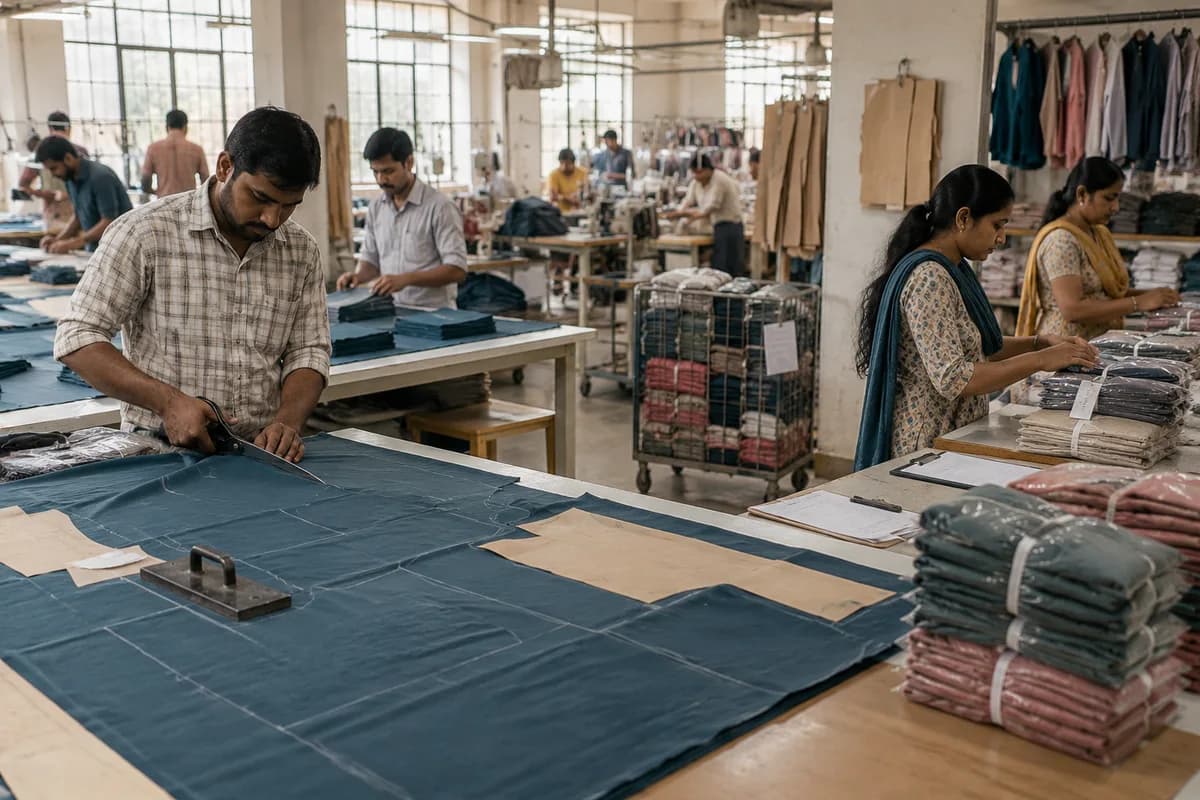
Shirt, knitwear, uniform and private label garment factories can run orders, cutting, sewing and packing in Apparel Manufacturer Management Software, which GullySystem configures. Each order carries its size ratio, fabric lots, cut bundles and sewing counts. Outside processing and the carton packing list follow. A short size shows at the cutting table, not at the dispatch bay.
What goes wrong before the software.
How the work flows through it, step by step.
- 1
Order and sample
The buyer order is entered by style, colour and size ratio. A size set sample is cut, measured against the spec sheet and approved, and the result is kept with the style.
- 2
Material planning
The bill of materials for each style gives the fabric, lining, zips, buttons and labels needed. Stock is checked by colour and dye lot, and purchase requests go out for the gap. Open purchase orders count against the gap.
- 3
Cutting
The cutting master spreads a lay to the marker plan, cuts bundles by size and records the plies and the length used. Bundle tickets are printed for every cut. Every bundle carries style, colour and size.
- 4
Sewing and outside work
Bundles move to sewing lines or subcontract units, and onward to embroidery or wash. Each movement is a delivery note with counts out, back and rejected by size.
- 5
Inspection and finishing
Inline checks catch faults at the operation. Final inspection passes lots against the buyer’s quality level, then pressing, tagging and folding follow. Rework goes back to the line.
- 6
Packing and shipment
Cartons are filled to the buyer’s size ratio. The packing list comes straight from the scanned count, and the invoice with its shipping papers is drawn from the same order.
What is inside.
Every module can be switched on, left out or changed to match how your team already works.
The business modules it is built from.
Each one is also available on its own, or inside a system built for you.
- Order Management
A revised purchase order updates the colour and size ratio in one place, so cutting and packing both pick up the change.
- Bill of Materials
Each style lists fabric length, lining, zips, buttons and labels by size, so material need is known before purchase requests are raised.
- Batch and Serial Tracking
Fabric rolls carry their dye lot and shade band, and a lay can be limited to a single lot to avoid mixed shades.
- Production Planning
Styles and quantities are placed on sewing lines by day from operation times and operator strength, and late bundles show against the ship date.
- Job Work Management
Bundles sent for embroidery, wash or subcontract sewing go out on a delivery note, and returned, rejected and pending pieces balance by size.
- Quality Control
Inline faults and final inspection results are logged by operation and operator, and failed pieces are routed to rework before packing.
- Payroll Management
Scanned operations are priced at each style’s rate for the operator, and advances are deducted to give the week’s payable.
- Stock Tracking and Alerts
Finished pieces are held by style, colour and size, and cartons closed against the ratio pack feed the packing list.
How we would put it in.
Setup, data migration, integrations and anything built on top.
Every part of the system, by area.
Take the modules you need. Each one works on its own or inside a larger system built for you.
- Applicant Tracking (5)
- CRM (8)
- Finance & Accounting (10)
- Helpdesk (4)
- Human Resources (13)
- Inventory Management (5)
- Project Management (7)
- Manufacturing (6)
- Procurement (4)
- Sales and Distribution (6)
- Field Service (5)
- Statutory and Compliance (4)
- Retail and POS (4)
- Bookings and Appointments (3)
- Subscriptions (2)
- Assets and Fleet (4)
- Platform (6)
- Analytics (2)
- Documents (1)
- All business solutions
One system, each person sees their part.
For owners
Read orders against ship dates, fabric cost against plan, rejection rates by unit and the week’s piece-rate payable, without walking the floor.
For merchandisers
Enter orders and revisions, follow sample approvals and watch material arrival. Answer a buyer’s question about a style from the order record. No calls to the floor.
For cutting masters
Plan lays from the order ratio, record plies and length used, and print bundle tickets that carry style, colour, size and bundle number.
For line supervisors and checkers
Scan bundles in and out of operations, log faults, and see the day’s target against the count by size.
For store and packing teams
Issue rolls and trims against orders, receive pieces from subcontract units, and pack cartons from the ratio on the order.
The numbers the owner asks for.
- Orders by style with cut, sewn, finished and packed quantities by size
- Fabric issued against marker plan, with end bits and balance by dye lot
- Bundles held at each sewing line and outside unit
- Rejection and rework counts by operation, line and subcontract unit
- Piece-rate earnings by operator, with advances and net payable
- Samples awaiting approval and the orders they hold back
- Packed cartons against the buyer’s ratio pack and ship date
Who this is built for.
- Garment factories making shirts, trousers, knitwear or kidswear for brands and export buyers
- Private label makers that cut and sew to retailers’ specifications
- Cut, make and trim units that take fabric from a buyer and return finished pieces
- Uniform and workwear makers handling size-wise bulk orders
- Factories that send pieces to outside embroidery, printing or wash units
When it is not the right choice.
- A tailor who stitches a few made-to-measure garments a week can use Tailoring Shop Management Software instead.
- A mill that spins yarn or weaves cloth is better served by Fabric Manufacturer Management Software.
Adapted to your business before it goes live.
You are not handed a login and left to it. The product is set up around your records, your people and the tools you already use.
Works alongside
- Barcode scanners and label printers
- SMS
- Accounting export
- Pattern and marker software export
Questions owners ask before a demo.
Does it replace our pattern and marker software?
No. Grading and marker making stay in your design tools. This system records the lay that was cut, the plies and the length used against the plan.
Can it follow a bundle through every operation?
Yes. Each bundle carries a ticket with style, colour, size and number. Scans at each operation show where the bundle is and how many pieces came through.
How are pieces at subcontract units kept in step?
Every movement is a delivery note with counts by size. Returned, rejected and pending pieces are balanced for each unit, so the balance lying there is known without a visit.
Can fabric be tracked by dye lot and shade?
Yes. Rolls are held by colour, lot, shade band and width, and a lay can be limited to one lot so two shades do not meet in a garment.
Does it work out piece-rate pay?
Yes, once the rate rules are agreed with you. Operators are credited for each scanned operation at the rate for that style, and the weekly total builds from those entries.
Can a buyer’s ratio pack be packed from it?
Yes. The order holds the carton ratio by size and colour. Finished stock is checked against it, and the packing list prints from the cartons closed.
What about export documents?
Commercial invoices and packing lists are produced from the order. Formats for customs and buyer portals are scoped with you, as rules differ by country.
Can the floor use it without typing?
Mostly. Bundle scans and tablet taps replace typing at the line. Supervisors enter fault codes from a short list. The list is yours.
Who owns the data?
You do. Order, cutting and wage records leave the system in a file layout that we agree with you and put in the quotation first.
How do we see it before deciding?
Cost follows how many cutting tables, sewing lines and subcontract units are tracked, how many users scan or enter, and which label printers and scanners are connected. Moving open orders and fabric roll stock across adds work too. A demo on a sample order comes first, then a quotation priced part by part.
How long before a sewing line can scan bundles?
Buyer orders with size ratios, the cutting register and bundle tickets with line counts would be the base, because that is where pieces go missing. Piece-rate wages, outside processing and packing come after. Each stage and its date is set in the proposal.
What does the merchandiser need to bring along?
Bring size charts, operation lists with their times, current piece-rate sheets, the fabric roll stock list and a running order or two. Sample documents matter: a buyer purchase order, a bundle ticket, a delivery note to a subcontract unit and a packing list. Merchandising, cutting, the lines and stores each need a decision-maker for questions.
Wondering what it would cost? Share your requirements and an engineer will come back with a scope.
Built for.
The trades this product is set up for. Pick yours to see how the work runs there.
See Apparel Manufacturer Management Software set up around your records.
Tell us how you run things today. An engineer reads it and writes back with what fits as it is, what would need changing, and what we would start with.
What happens after you share your requirements
- A senior engineer reads your answers. Nobody phones first.
- Within one business day you get a written note: what we understood, what we would start with, and the questions we still have.
- If it fits, a proposal follows with the order of work, what we need from you and what you receive at each step.
- No call is booked and nothing is paid until you have read the note. Your details stay with us.
Start with your requirements
Seven short steps that tell us what you need. A senior engineer reads them before anyone gets in touch.
Share your requirements