Sevas, donations, numbered receipts and devotees on one set of temple records.
A temple management system for the temple office. Pooja and seva bookings are taken at the counter and as requests online, and donations are recorded by category. Each receives a numbered PDF receipt, with your trust’s tax-exemption details printed where it has them. Devotees, priests, events and trust members sit in one place, and the temple gets its own website with timings, sevas and a donation page.
- Sevas, timings, donation heads and receipt numbering entered first
- Devotee lists and past receipt books migrated
- Configured and looked after by one small team
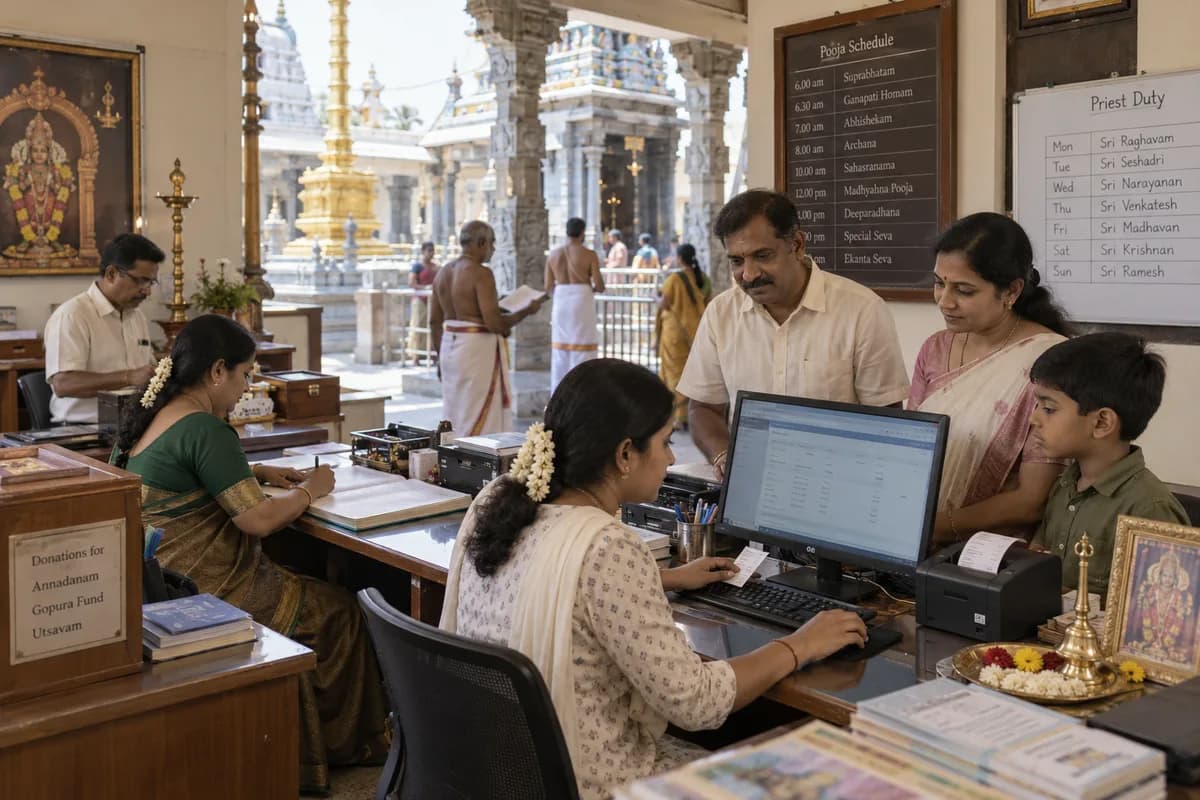
The temple office runs Temple Management Software, set up by GullySystem for trusts with a seva counter. Counter staff, priests and trustees use it. Seva and pooja bookings, donations by category, numbered PDF receipts, devotee details with gothra and nakshatra, festivals and priest duties sit together. The temple also gets a website with timings, sevas and a donation page.
What goes wrong before the software.
How the work flows through it, step by step.
- 1
Sevas and slots
Enter each pooja or seva with the name your office uses, the amount or free-will offering, the days performed, time slots and bookings per slot. Choose which ones devotees may request online, and which stay counter-only.
- 2
Booking
At the counter, staff pick the seva, date and slot, note the gothra, nakshatra, rashi and sankalpa, and take payment. Online requests arrive as pending bookings with those details filled in by the devotee.
- 3
Receipt
Every paid booking or donation takes the next number in the series and comes out as a PDF. Donation receipts carry the trust’s tax-exemption details and the donor’s tax ID where the trust is registered for exemption.
- 4
Priest assignment
The office assigns a priest to the booking and marks it confirmed, assigned or completed. The priest opens the day’s list with every sankalpa on it, in the order of the homa.
- 5
Closing the day
The dashboard shows today’s donations, the month’s total, the day’s bookings and online requests still waiting, with collections by payment mode. Exports go to the trust’s accountant for the audit file.
What is inside.
Every module can be switched on, left out or changed to match how your team already works.
Pooja booking
Set each seva’s price type, duration, days, time slots, bookings per slot and required devotee details. Bookings are numbered and move from pending to confirmed, assigned, completed or cancelled.
Learn moreOnline seva booking
Let devotees request a seva from your temple website with date, slot, gothra, nakshatra and sankalpa. The office confirms the request and takes payment at the counter when the family arrives.
Learn moreDonations by category
Record every donation against a head you define, such as annadana, gau seva, building fund or hundi, with the donor’s tax ID, payment mode, reference and purpose. Each fund reads separately.
Learn moreOnline donations
Let devotees give from your website by bank transfer and enter the transaction reference. A numbered receipt is raised with that reference for matching against the bank statement.
Learn moreReceipts and PDF
Issue one numbered series for donations and sevas as PDFs with your trust name and registration number. A wrong receipt is cancelled with a reason instead of deleted, so every number is accounted for.
Learn moreDevotee register
Find devotees by phone number with gothra, nakshatra, rashi, birthday, anniversary, family members and preferred language, linked to their bookings and donations, so a returning family is greeted by name.
Learn moreFestivals and events
Manage festivals, homas, bhajans, pravachanas, annadana and classes with dates, a banner and a website page. Event registration is not on screen yet and can be built at set-up.
Learn morePriests
Record each priest’s specialisation, languages, available days and hours. Assign them to bookings, and choose whether they appear on the website.
Learn moreTrust members
List trustees with role, photo, term and whether their contact is shown, optionally on the website’s about page, so devotees know who to write to.
Learn moreAnnouncements and gallery
Post festival notices, timing changes, special poojas and appeals with publish and expiry dates, and upload photos into albums for each utsava so the Brahmotsavam pictures stay together.
Learn moreTemple website with your domain
Publish a site with the deity, history, darshan and aarti timings, dress code, sevas, events, gallery and a donation page on your own domain. The office changes the festival banner.
Learn moreThe business modules it is built from.
Each one is also available on its own, or inside a system built for you.
- Receipts Management
The temple office issues donations and sevas in one numbered receipt series as PDFs, and a wrong receipt is cancelled with a reason.
- Online Booking Portal
Devotees request a seva from the temple website with date, slot, gothra, nakshatra and sankalpa, and the office confirms it.
- WhatsApp, SMS and Email Notifications
Staff post festival notices, timing changes, special poojas and appeals with publish and expiry dates, plus photo albums for each utsava.
- Roles and Permissions
The trust lists each trustee with role, photo and term, and sets whether the contact is shown on the website’s about page.
- Appointment Scheduling
Each seva has its own days, time slots and bookings per slot, and every booking moves from pending to confirmed, assigned and completed.
- Contact & Account Management
Devotees are found by phone number with gothra, nakshatra, rashi and family members, linked to every booking and donation they have made.
- Task Management
Priests are assigned to bookings by specialisation, language and available days, and each priest opens the day’s list of sevas and sankalpas.
How we would put it in.
Setup, data migration, integrations and anything built on top.
Every part of the system, by area.
Take the modules you need. Each one works on its own or inside a larger system built for you.
- Applicant Tracking (5)
- CRM (8)
- Finance & Accounting (10)
- Helpdesk (4)
- Human Resources (13)
- Inventory Management (5)
- Project Management (7)
- Manufacturing (6)
- Procurement (4)
- Sales and Distribution (6)
- Field Service (5)
- Statutory and Compliance (4)
- Retail and POS (4)
- Bookings and Appointments (3)
- Subscriptions (2)
- Assets and Fleet (4)
- Platform (6)
- Analytics (2)
- Documents (1)
- All business solutions
Topics beyond the modules.
Each page covers one part of how the system is used, connected or controlled.
Temple Software Connections to Bank Transfers, WhatsApp and CSV
The temple system connects to bank transfer references, a WhatsApp chat button on the website and CSV exports for the accountant.
Learn moreReports for Temple Trustees and Accountants
The dashboard and reports read from the donations, sevas and receipts the office already records.
Learn moreTemple Software Views for Office, Trustees and Priests
A temple has counter staff, trustees, accountants and priests, and each reads a different part of the same records.
Learn moreOne system, each person sees their part.
For temple office and counter staff
Book sevas, record donations, print or download receipts and add new devotees. On festival days, several counters can issue receipts from the same series without a clash of numbers.
For trustees and managing trustees
View today’s and this month’s donations, bookings and payment modes, and check cancelled receipts with their reasons before the monthly meeting.
For accountants
Download donations, bookings and receipts as spreadsheets for the books and the trust’s audit, with the cancelled numbers listed.
For priests
See the sevas assigned for the day with each devotee’s gothra, nakshatra and sankalpa details, in the order of the homa.
The numbers the owner asks for.
- Today’s and this month’s donations
- Donations and seva bookings totals
- Collections by payment mode: cash, cheque, bank transfer and online
- Receipts register, downloadable as CSV
- Seva bookings by date, with online requests still pending
- Devotee list, downloadable as CSV
Who this is built for.
- Temples run by a registered trust with a seva counter and an office
- Temples that issue donation receipts and want them numbered and on PDF
- Temples with festival seasons that bring long queues for sevas
- Mutts and temple trusts with devotees in other cities who want to book or give from afar
- Temples that want their own website with timings and seva details
When it is not the right choice.
- A small shrine with a single priest and no receipts. A notebook is enough.
- Temples under a government endowments department that must use the department’s own system.
Adapted to your business before it goes live.
You are not handed a login and left to it. The product is set up around your records, your people and the tools you already use.
Works alongside
- Bank transfer references
- WhatsApp chat button on your website
- CSV export for your accountant
Questions owners ask before a demo.
Can devotees book sevas online from our website?
Yes, for the sevas you open to online booking. The devotee picks the date and slot and enters gothra, nakshatra and sankalpa. The request reaches the office as pending, and payment is taken at the counter when it is confirmed.
Can it print tax-exemption receipts?
It prints your trust’s tax-exemption registration number and the donor’s tax ID on donation receipts, when your trust is registered and you enter the details. The software records what you give it. It does not grant or certify exemption status.
How does it handle hundi counting?
The hundi count is entered as a donation under its own head with the date and who recorded it. Hundi totals then appear alongside counter and online donations in the same reports.
Can the trust’s accountant use it with an accounting package?
Not directly. Donations, bookings, devotees and receipts download as CSV spreadsheets which your accountant can import into the books. If the trust wants a live connection to an accounting package, it is priced in the proposal.
Can old devotee and donation records be moved?
Yes. Devotee lists and past donations are loaded from Excel sheets or typed registers ahead of go-live, and receipt numbering continues from where your current book ends, so no number repeats.
Can counter staff use it on a tablet or phone?
Yes. It runs in the browser, so a tablet at the seva counter works. Receipts download as PDFs that can be printed or shared with the devotee.
Who owns the temple’s data?
The trust does. Records download as CSV from the reports screen whenever you want them, and how the full record is handed over is agreed in the proposal.
What does the trust have to pay?
No price is published. It depends on your sevas, counters and what the website needs. Domain setup, the accountant export and devotee records to bring in add work. The trustees see a demo first. The cost comes in a written proposal.
Is it worthwhile for a small temple?
Only if you issue receipts regularly or have festival rushes. A temple with a few donations a month is fine with a receipt book. Unsure? Describe your seva and donation routine, and we will tell you if a receipt book is enough.
When could the counter begin issuing numbered receipts?
Pooja booking, donations by category and the numbered receipt series would come first, since the counter needs them daily. The devotee register follows. Online seva booking, festivals, priests, trustees and the website arrive later. Dates are set per stage in the proposal. Moving old registers in affects the pace.
What should trustees and the office gather before set-up?
Gather the list of sevas with timings and prices, your donation heads, the receipt wording, and the devotee and donation records held in Excel or registers. Hundi counting practice should be agreed with the trustees. Photos and text for the website are needed. The office, a trustee and the accountant should each name someone.
Wondering what it would cost? Share your requirements and an engineer will come back with a scope.
Every part, on its own page.
Each page covers one part of the system: what it records, who uses it and what it hands on.
- Seva Booking and Counter Billing for Temples
- Online Seva Requests for Temple Websites
- Temple Donations by Head and Purpose
- Numbered Receipts for Temple Donations and Sevas
- Temple Devotee Register with Family Details
- Temple Priest Roster and Daily Seva List
- Temple Festival and Event Calendar
- Temple Website with Timings, Sevas and Donation Page
- Temple Software Connections to UPI, WhatsApp and CSV
- Trust Members Listed with Role, Photo and Term
- Temple Announcements and Utsava Photo Albums
- Reports for Temple Trustees and Accountants
- Online Temple Donations by UPI and Bank Transfer
- Temple Software Views for Office, Trustees and Priests
Written for this trade.
Practical notes on running the business, not product marketing.
Temple Management Software and Online Seva Booking
What temple management software should do: seva and pooja booking at the counter and online, donation receipts, 80G, devotees, events and accounts.
Learn moreReceipts, job cards and prescriptions: print formats to settle first
Which printed receipts, job cards and prescriptions to keep identical on go-live day, and how to approve each against an old sample.
Learn moreWhy receipt and invoice numbers repeat or skip in management software
Receipt and invoice numbers repeat or skip because of series setup, cancellations and edits. Learn how to set series and rules so every gap can be explained.
Learn moreBuilt for.
The trades this product is set up for. Pick yours to see how the work runs there.
Related products.
See Temple Management Software set up around your records.
Tell us how you run things today. An engineer reads it and writes back with what fits as it is, what would need changing, and what we would start with.
What happens after you share your requirements
- A senior engineer reads your answers. Nobody phones first.
- Within one business day you get a written note: what we understood, what we would start with, and the questions we still have.
- If it fits, a proposal follows with the order of work, what we need from you and what you receive at each step.
- No call is booked and nothing is paid until you have read the note. Your details stay with us.
Start with your requirements
Seven short steps that tell us what you need. A senior engineer reads them before anyone gets in touch.
Share your requirements