Hold seva bookings, donations, numbered receipts and priest schedules together.
A temple runs on seva receipts torn off at a counter, donation registers and a hundi counted in front of trustees, and a festival overloads all three. The temple management software holds seva bookings, donations, numbered receipts and priest schedules together, and devotees who have moved away can request a seva online instead of calling the office.
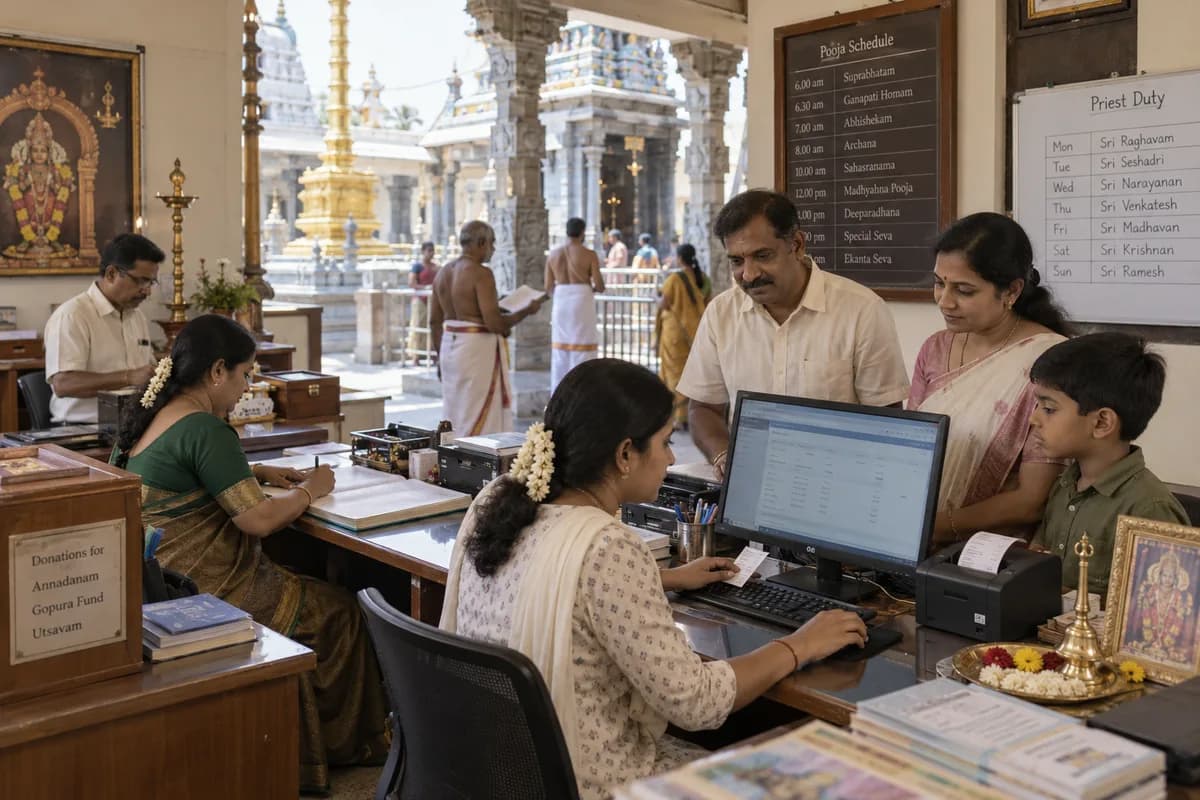
A devotee wants an archana on her birthday star. A family books a Sunday pooja. Someone abroad gives towards annadanam. Each of those lands in a different register in a different room.
The temple management software is built for this counter, then adapted to your sevas, timings and the way the trust keeps its accounts. We would start with an ordinary week at the counter, because festival days only show what was already breaking.
At the counter a clerk writes the seva, the name, the gothra and the nakshatra, takes cash, card or a QR code payment, and tears off a receipt. Tomorrow’s pooja list reaches the priests on paper, and phone bookings are added in pen at the bottom.
Donations come in for annadanam, the gopura fund or an utsavam, some with a tax number for the tax receipt. The hundi is counted in front of trustees and written into a register before the bank deposit.
At month end the treasurer matches receipt books and the donation register against the bank statement. Navaratri brings weeks of extra counter work for the same few clerks.
What goes wrong for temples and religious trusts without a proper system.
What we would build for temples and religious trusts.
Named the way your team already talks about the work. We start with whichever part the audit shows is costing you most.
A requirements checklist for temples and religious trusts.
What to cover, which reports to ask for and what to put to every vendor, ready to print or save as a PDF.
A product already built for temples and religious trusts.
It is adapted to how your business works before it goes live, and anything your trade needs that it lacks is added then.
Temple Management Software
Pooja and seva bookings, donations with numbered PDF receipts, devotees, events, priests and a temple website with your own domain.
Other products in the same sector as temples and religious trusts.
The business modules temples and religious trusts use most.
Each one is also available on its own, or inside a system built for you.
- Receipts Management
- Online Booking Portal
- WhatsApp, SMS and Email Notifications
- Roles and Permissions
- Appointment Scheduling
- Contact & Account Management
- Task Management
- All business solutions
All solutions by area
- Applicant Tracking (5)
- CRM (8)
- Finance & Accounting (10)
- Helpdesk (4)
- Human Resources (13)
- Inventory Management (5)
- Project Management (7)
- Manufacturing (6)
- Procurement (4)
- Sales and Distribution (6)
- Field Service (5)
- Statutory and Compliance (4)
- Retail and POS (4)
- Bookings and Appointments (3)
- Subscriptions (2)
- Assets and Fleet (4)
- Platform (6)
- Analytics (2)
- Documents (1)
Where AI can help temples and religious trusts.
Each one reads records you already keep, and a person approves every decision.
The services behind it.
Web and Mobile Application Development
Web and mobile apps for customers, field staff and dealers, built to work on ordinary phones.
Learn moreBusiness Process Automation
Approvals, reminders, follow-ups and reports that run on their own instead of on someone remembering.
Learn moreAPI and System Integration
Accounting software, WhatsApp, payment gateways, tax portals and your own apps sharing one set of numbers.
Learn moreCloud Engineering and Managed Infrastructure
Hosting, backups and monitoring handled, so the system is up when the shop opens.
Learn moreAll our other services
- Custom Software and Product Engineering
- Software Maintenance, Support and Rescue
- AI and Intelligent Automation
- ERP, CRM and Business Software Implementation
- Data Engineering and Business Intelligence
- UI/UX Design and Prototyping
- DevOps & Automation Services
- QA and Software Testing
- Performance Engineering
- Cybersecurity and Application Security
- IoT and Edge Computing
- Technology Strategy and Product Consulting
- E-Commerce and Digital Commerce
- MVP Product Development
- SaaS Product Development
- WhatsApp Business API and Chatbots
- Data Migration and Moving Off Spreadsheets
- Training and Adoption
- Data Protection and Privacy Readiness
- Tax and e-Invoice Engineering
- Managed IT Support
- Dedicated Team and Staff Augmentation
- Business Intelligence and Reporting Tools
- Cloud Cost Optimisation
- Global Compliance and Localisation
Written for temples and religious trusts.
Practical notes on running the business, not product marketing.
How the work runs from Bengaluru for your city.
- 1
The audit, by call
A screen-share and a look at the sheets, accounting reports and WhatsApp groups your team uses. No travel needed.
- 2
A written proposal
Scope, what we build first and the cost, agreed in writing before anything starts.
- 3
Build in short rounds
Working screens shared every few weeks. Your team tests them from your own office.
- 4
Go-live, in person when it helps
For data migration and training we can come to your city. Travel is agreed in advance.
- 5
Support online
Fixes, changes and hosting handled remotely by the same team that built it.
The work we have published.
We only name clients whose work is published. None of them is in this trade; they show how the team works, not that it has built for this trade.
PetSeva: matching owners to the right vet, at any hour
A two-sided veterinary platform where vets are searchable by specialisation and bookable outside clinic hours. It now carries more than 2,000 veterinary doctors.
Read the case study Paying guest accommodationSAM Atithi Pavathi: bed-level occupancy as the source of truth
PG management software where allocation, rates and invoices are derived from bed-level occupancy and not maintained in parallel spreadsheets.
Read the case study School transport servicesSAM Tours: school transport on a single ledger
Registration, fee collection, routing and finance write to the same records, closing the gap between journeys run and fees collected.
Read the case study Microfinance and Self Help GroupsVikasa RDO: making SHG loan recovery auditable
Loan proposals, recoveries and commissions sit on one record, with a person attached to every state change, so a business handling a bank’s money can show where each rupee went.
Read the case studyQuestions temples and religious trusts ask before they call.
How does our auditor get the figures he needs?
Day-wise collection by payment mode, and donations by fund, come out as CSV for him. The trust’s books stay where they are, and he works as before.
Does it print tax-exemption details on donation receipts?
It prints your trust’s tax-exemption registration number and the donor’s tax number on donation receipts. Whether a receipt qualifies depends on your trust’s registration, which stays between you and your auditor.
Can a devotee abroad ask for a seva in his own name?
Yes. He picks the seva, the date and the gothra on your website, and the request reaches the office as pending. Once the office confirms it, the money is collected at the counter. Posting the prasadam back to him stays the temple’s own arrangement.
Can elderly counter staff use it?
Yes. The counter screen asks for the seva, date, name and payment. Screens are in English, with sevas listed under the names your office already uses.
How is a temple trust system quoted?
Counters, clerks, priests and the festivals to be handled set the scope. Online seva requests and fund-wise donation accounts are separate parts. Bringing over old receipt books adds more. Your seva list is keyed in for a trial, and a priced quotation follows.
What should the trust have ready?
The seva list with rates, receipt books, the donation register, the priest schedule and last festival’s plan. A trustee and the counter clerk should join the trial sessions. They know the rush days.
Whose is the donation history if the trust changes tools?
The trust’s own, with the source code. Receipts, donations and bookings can be returned as ordinary sheets. The same developers answer for faults. A trust server is acceptable for hosting.
What happens after I share my requirements?
An engineer reads what you send and replies within one business day. We then look at the software, spreadsheets and WhatsApp groups your business runs on today and write down what works, what slows your team down and what is missing. A demo login, a screen-share or a few screenshots are enough. You get a short written summary ordered by priority, with no obligation to hire us afterwards.
How much will the software cost?
We don’t publish a price, because it depends on what the system has to do. That first review settles the scope, and the cost goes into a written proposal before any work starts.
Cities where temples and religious trusts are common.
Related industries.
Part of a wider group.
Tell us how your business runs today.
A few lines on your spreadsheets, software and WhatsApp groups is enough. We reply the same working day.
What happens after you share your requirements
- A senior engineer reads your answers. Nobody phones first.
- Within one business day you get a written note: what we understood, what we would start with, and the questions we still have.
- If it fits, a proposal follows with the order of work, what we need from you and what you receive at each step.
- No call is booked and nothing is paid until you have read the note. Your details stay with us.
Start with your requirements
Seven short steps that tell us what you need. A senior engineer reads them before anyone gets in touch.
Share your requirements