Recreation and entertainment · Software for country clubsRun membership, dining, courts and events from one member record.
A country club sells a membership and then bills for everything that member does inside the gates. The country club software keeps member accounts, dues, facility bookings, dining charges and events together. Guest passes and family linking are handled on the same record. The board’s reports come from those same entries.
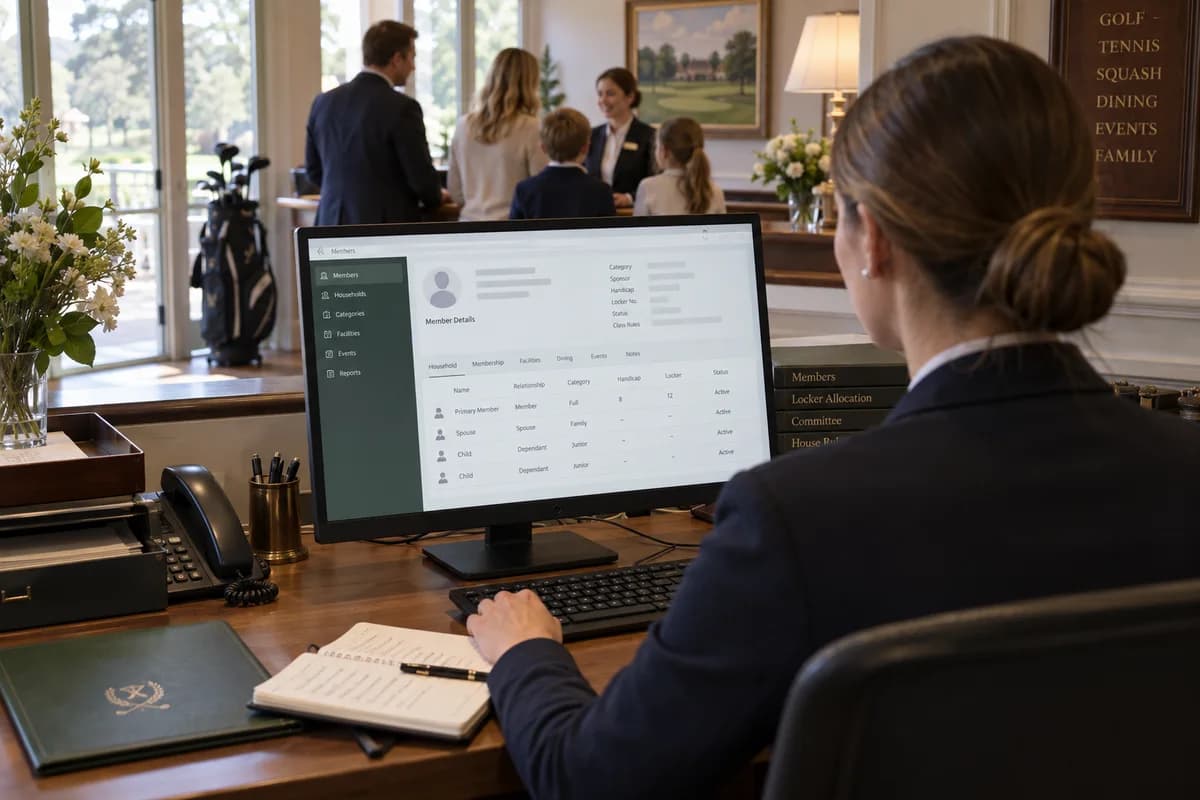
Members join a club for a mix of dining, sport, children’s activities and social events. Each of those areas has its own staff and its own charges, from the sommelier to the tennis coach. The member sees one club and expects one statement.
Country club software puts the member at the centre. Dues, locker fees, food and drink, court and tee bookings, lessons and guest passes all post to one account. The office no longer adds up three separate tabs before it prints a statement.
The membership office handles applications, committee approvals, debenture transfers and resignations. Front desk staff book courts, rooms and tee times for members who ring or walk in, and they check guest passes at the door. The kitchen and bar post charges to member numbers from the point of sale. Coaches run squash, tennis and pickleball lessons for adults and juniors, and they record who attended so that the parent or the member can be billed. The phone rings early.
Events staff plan weddings, galas, brunches and tournaments, and hold deposits for each date, whether the venue is a marquee or the banquet hall. At month end the finance team issues statements, chases overdue dues and applies house rules to accounts that stay unpaid. The committee asks for a count of active members, a list of resignations, the locker waiting list and a view of food and beverage cost. Those figures are rarely in one place. That slows every meeting.
What goes wrong for country clubs without a proper system.
What country clubs gain from one system.
Not a feature list. These are the moments in the working day that go differently once the records sit together.
What we would build for country clubs.
Named the way your team already talks about the work. We start with whichever part the audit shows is costing you most.
A requirements checklist for country clubs.
What to cover, which reports to ask for and what to put to every vendor, ready to print or save as a PDF.
A product already built for country clubs.
It is adapted to how your business works before it goes live, and anything your trade needs that it lacks is added then.
Country Club Management Software
Membership, dues, court and room bookings, dining charges, guest passes, events and committee reports for country clubs and social clubs.
What Country Club Management Software covers, feature by feature
- Membership applications for a country club
- Member and family records for country clubs
- Dues and joining fees for country clubs
- Facility and court bookings for country clubs
- Dining and bar charges for country clubs
- Lessons and coaching for country clubs
- Events and functions for country clubs
- Guest passes and entry log for country clubs
- Member statements and receipts for country clubs
- Committee reports for country clubs
Other products in the same sector as country clubs.
The business modules country clubs use most.
Each one is also available on its own, or inside a system built for you.
Contact & Account Management
A member, spouse and children sit under one family record with their ages and passes. Staff look up a face at the gate or the bar. Guests link to their host.
Learn moreWorkflow and Approvals
A new membership goes through proposer, seconder and committee vote. Each step is dated. Transfer of a membership between families follows the same route, and pending names stay visible to the secretary.
Learn moreSubscription Billing
Annual dues, monthly subscriptions and entrance fees are billed by membership class. Junior and senior rates differ. Lapsed members stop booking tee times until the account is paid up.
Learn moreResource and Room Booking
Tennis courts, the banquet hall, card room and tee times are booked by slot. Members hold slots for guests. Court time released after a no-show returns to the pool.
Learn morePoint of Sale Billing
Bar, restaurant and pro shop tabs are charged to the member’s number and added to the monthly statement. A server finds the member by name or card. Signed chits are matched later.
Learn moreAppointment Scheduling
Lessons with the golf pro, tennis coach or swim instructor are booked into their diaries. A rained-off lesson is moved in one step. Coaches see their fee earned.
Learn moreReceipts Management
Members pay dues at the front desk, by transfer or on the club account. A receipt shows what the payment cleared. Advance payments for events are held against the function.
Learn moreDashboards and KPIs
The committee sees dining revenue, court use and dues collected for the club year. Guest play against member play is shown. Figures come from the same entries staff post.
Learn moreAll solutions by area
- Applicant Tracking (5)
- CRM (8)
- Finance & Accounting (10)
- Helpdesk (4)
- Human Resources (13)
- Inventory Management (5)
- Project Management (7)
- Manufacturing (6)
- Procurement (4)
- Sales and Distribution (6)
- Field Service (5)
- Statutory and Compliance (4)
- Retail and POS (4)
- Bookings and Appointments (3)
- Subscriptions (2)
- Assets and Fleet (4)
- Platform (6)
- Analytics (2)
- Documents (1)
Where AI can help country clubs.
Each one reads records you already keep, and a person approves every decision.
The services behind it.
Business Process Automation
Application, committee approval, dues billing, guest pass checks and resignation steps follow set rules. The office handles exceptions such as a family change instead of keying each routine charge by hand.
Learn moreWeb and Mobile Application Development
Members book courts, tee times and tables, view their statement and register for events from a phone. Staff see the same bookings at the front desk, bar and coaching office.
Learn moreAPI and System Integration
The point of sale in the bar and kitchen, access control at the gate and the accounting software connect to the member account. Charges and entries move across without retyping a bar slip.
Learn moreAll our other services
- Custom Software and Product Engineering
- Software Maintenance, Support and Rescue
- AI and Intelligent Automation
- ERP, CRM and Business Software Implementation
- Data Engineering and Business Intelligence
- UI/UX Design and Prototyping
- Cloud Engineering and Managed Infrastructure
- DevOps & Automation Services
- QA and Software Testing
- Performance Engineering
- Cybersecurity and Application Security
- IoT and Edge Computing
- Technology Strategy and Product Consulting
- E-Commerce and Digital Commerce
- MVP Product Development
- SaaS Product Development
- WhatsApp Business API and Chatbots
- Data Migration and Moving Off Spreadsheets
- Training and Adoption
- Data Protection and Privacy Readiness
- Tax and e-Invoice Engineering
- Managed IT Support
- Dedicated Team and Staff Augmentation
- Business Intelligence and Reporting Tools
- Cloud Cost Optimisation
- Global Compliance and Localisation
How the work runs from Bengaluru for your city.
- 1
The audit, by call
A screen-share and a look at the sheets, accounting reports and WhatsApp groups your team uses. No travel needed.
- 2
A written proposal
Scope, what we build first and the cost, agreed in writing before anything starts.
- 3
Build in short rounds
Working screens shared every few weeks. Your team tests them from your own office.
- 4
Go-live, in person when it helps
For data migration and training we can come to your city. Travel is agreed in advance.
- 5
Support online
Fixes, changes and hosting handled remotely by the same team that built it.
The work we have published.
We only name clients whose work is published. None of them is in this trade; they show how the team works, not that it has built for this trade.
PetSeva: matching owners to the right vet, at any hour
A two-sided veterinary platform where vets are searchable by specialisation and bookable outside clinic hours. It now carries more than 2,000 veterinary doctors.
Read the case study Paying guest accommodationSAM Atithi Pavathi: bed-level occupancy as the source of truth
PG management software where allocation, rates and invoices are derived from bed-level occupancy and not maintained in parallel spreadsheets.
Read the case study School transport servicesSAM Tours: school transport on a single ledger
Registration, fee collection, routing and finance write to the same records, closing the gap between journeys run and fees collected.
Read the case study Microfinance and Self Help GroupsVikasa RDO: making SHG loan recovery auditable
Loan proposals, recoveries and commissions sit on one record, with a person attached to every state change, so a business handling a bank’s money can show where each rupee went.
Read the case studyCheck the difficult cases before choosing software.
Use examples from your own records to test the workflows that matter in your business.
Dues and statements
Can you explain the balance from its original documents?
Select a partly settled example in “Dues and statements”. Ask for the invoice, allocated receipts and remaining balance to be shown together before agreeing the opening figures.
Background reading: ERPNext: outstanding invoices
Facility and court bookings
What becomes available when a booking is moved or cancelled?
Use “Facility and court bookings” to move a booking, then cancel a second example. Check the released slot, the person or resource still assigned, and any amount left to settle before accepting the revised schedule.
Background reading: ERPNext: appointment records
Questions country clubs ask before they call.
Can members book courts and tables from a phone?
Yes. A member signs in to see open slots and holds one within the club’s own rules. Staff see the same slot on the desk screen, so a phone booking and a counter booking never meet.
Does it link to our point of sale at the bar?
Often yes. A charge from the till can post to the member number. Whether your till can send it is checked with its supplier during implementation.
Can the committee approve new members in the system?
Yes. An application moves through sponsor, committee and joining fee steps, and each decision is recorded. The committee sees its list before the meeting.
Is a small social club too small for this?
A very small social club may not need it. A club with a few hundred members and one bar can run on a ledger and a committee book. Courts, a restaurant and function hire together make a spreadsheet hard to keep.
How is a club management system quoted?
Begin with which parts go in: membership records, dues, court and facility bookings, dining charges, events, guest access and committee reports. Members, outlets, point of sale terminals and desk users shape the size. Moving the membership list adds effort. After we try screens on your records, each part is priced alone.
What should a club have in hand before work begins?
Bring the member register, a dues statement, booking sheets for courts and rooms, bar and dining bills, an event contract and a guest pass record. Someone from the membership office, the front desk, finance and events should be ready to help with queries and screen reviews.
Who holds our member data if the club moves on?
The club does. All member records and the code stay with it, and plain files hand them back whenever the committee asks. The builders look after support. GullySystem hosts, or the committee may move it.
What happens after I share my requirements?
We review your brief and clarify the work with you. We then look at the software, spreadsheets and WhatsApp groups your business runs on today and write down what works, what slows your team down and what is missing. A demo login, a screen-share or a few screenshots are enough. You get a short written summary ordered by priority, with no obligation to hire us afterwards.
How much will the software cost?
We don’t publish a price, because it depends on what the system has to do. That first review settles the scope, and the cost goes into a written proposal before any work starts.
Part of these wider groups.
Tell us how your business runs today.
A few lines on your spreadsheets, software and WhatsApp groups is enough. We reply the same working day.
What happens after you share your requirements
- We review your brief and the systems you already use.
- We clarify the workflow, missing information and the work to consider first.
- The proposed scope sets out the deliverables, responsibilities and dependencies.
- Review the scope and commercial terms before deciding whether to proceed.
Start with your requirements
Describe your current process, the people involved and the change you need. Start with the details you know; we can clarify the rest together.
Share your requirements